

🔍 Click to enlarge
Image created by XtremeOffice
Created by XtremeOffice
By the manufacturer
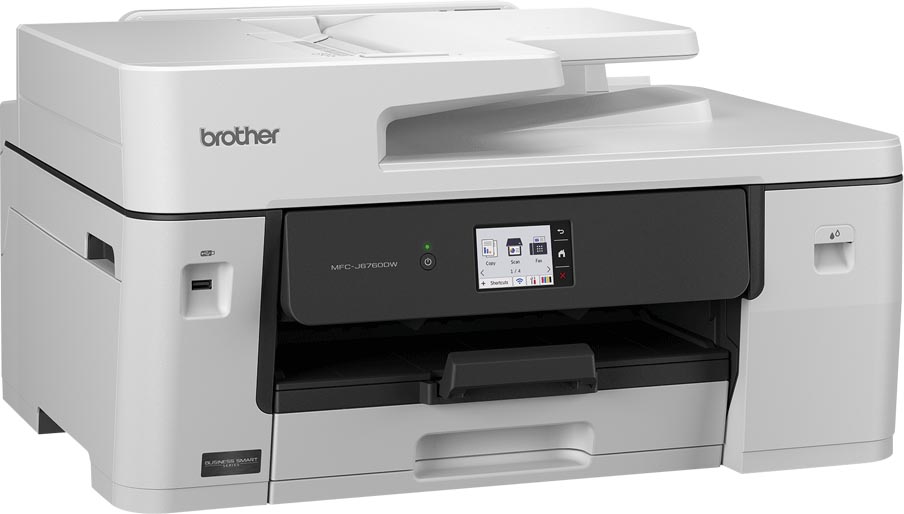
The image may differ from the exact product. Always check the specifications for exact size, colour and features. In the generated lifestyle/demonstration photos (with captions created by XtremeOffice), the scale shown is not always realistic — the product is sometimes deliberately shown large and prominently for recognisability.
Brother All-in-One printer MFC-J6760DW
€408,79
incl. VAT
€337,84 excl. VAT (21%)
You are ordering: Size: A3 · Colour: Grey
Price excluding shipping costs: €4,95 incl. VAT for orders under €49,95. From €49,95 we ship for free.
9,1/10 shop rating (55 reviews)
Business purchase: returns only after consultation
Safe payment: iDEAL, Bancontact, credit card or pay on receipt (8 days)
✗ Not in stock
Expected from supplier: week 49 (30 November - 6 December 2026)
⚖ This item is available exclusively to business customers.
It weighs more than 25 kg. Private individuals cannot order it. Ordering for business? Then enter your KVK or VAT number at checkout or in your account.
Brand: brother
| Article number | 90000009031 |
|---|---|
| EAN | 4977766847148 |
| OEM number | MFCJ676 |
| Weight | 30,000 kg |
|---|---|
| Dimensions | B: 500 mm × H: 500 mm × D: 900 mm |
| Customs tariff (HS code) | 84433100 |
| VAT rate | 21% |

This is why Dex likes this article
Grey all-in-one that combines printing, copying, scanning and faxing in a single device. With A3 format, Wi-Fi and automatic double-sided printing at 31 ppm, you work quickly and efficiently.
When do you choose this product?
What does the Brother MFC-J6760DW do, and when do you need it?
The Brother MFC-J6760DW is an all-in-one inkjet printer that combines printing, copying, scanning and faxing in a single device. This makes it suitable for home offices or small businesses where you work with several functions at once and don't want to buy a separate device for each task.
Why choose an A3-format all-in-one?
Most office printers stick to A4, but this Brother printer supports up to A3. That is a clear advantage if you regularly want to print large documents, overviews, presentations or drawings without going to a print shop. You get more space on paper without an extra step in between.
Print speed and resolution in practice
With a print speed of 31 pages per minute in black and white and 30 pages per minute in colour, this printer handles batches of documents quickly. The resolution of 4,800 x 1,200 dpi ensures that colour details are displayed sharply, which is especially noticeable with charts or images. The input tray holds 250 sheets, so you need to refill paper less often during larger print jobs.
Practical tips on connectivity and consumables
The built-in Wi-Fi makes a wired connection unnecessary, and the automatic double-sided printing function (duplex) saves paper on longer documents. To replace the ink, use the LC527BK (black), LC527C (cyan), LC527M (magenta) and LC527Y (yellow) cartridges. By keeping these codes handy, you know exactly which cartridges to reorder as soon as a colour runs low, without having to consult the device.
Specifications according to the manufacturer
Printer, copier, scanner and fax
Print resolution: 4,800 x 1,200 dpi
Print speed black and white: 31 ppm
Print speed colour: 30 ppm
Paper size: max. A3
Input tray capacity: 250 sheets
Wi-Fi
Automatic duplex printing
Ink cartridges: black (LC527BK), cyan (LC527C), magenta (LC527M) and yellow (LC527Y)
Specifications
Manufacturer
Hazard information
No hazard classification applies according to the available manufacturer and supplier information.
This product contains no substances classified as hazardous under the CLP Regulation.
Product information checked by XtremeOffice
This page has been compiled based on information from the manufacturer and our supplier. Last checked on 14-11-2026.
×
‹
›
![]()