

🔍 Click to enlarge
Image created by XtremeOffice
Created by XtremeOffice

By the manufacturer
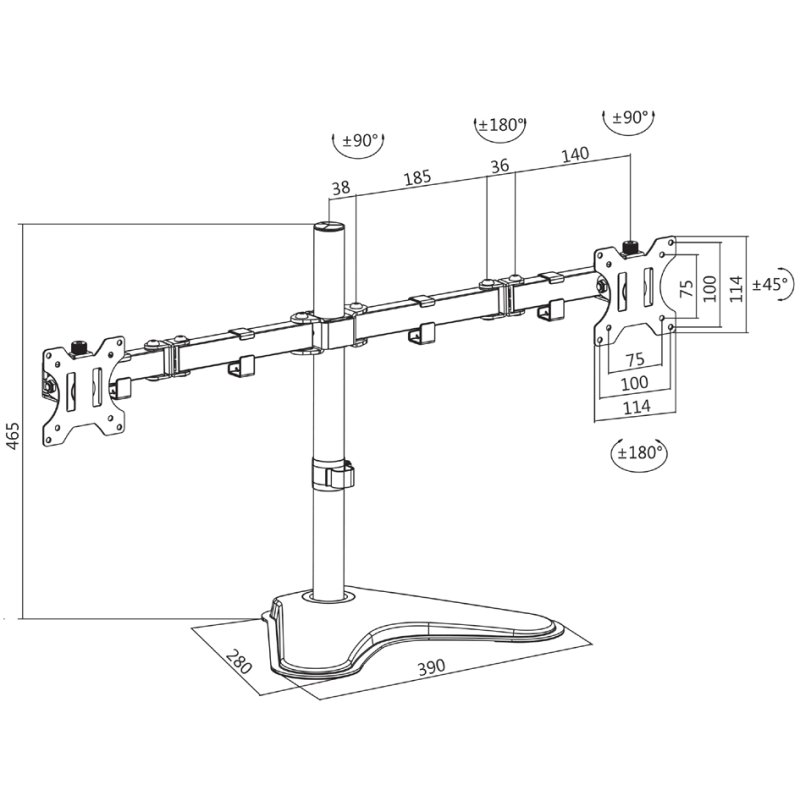
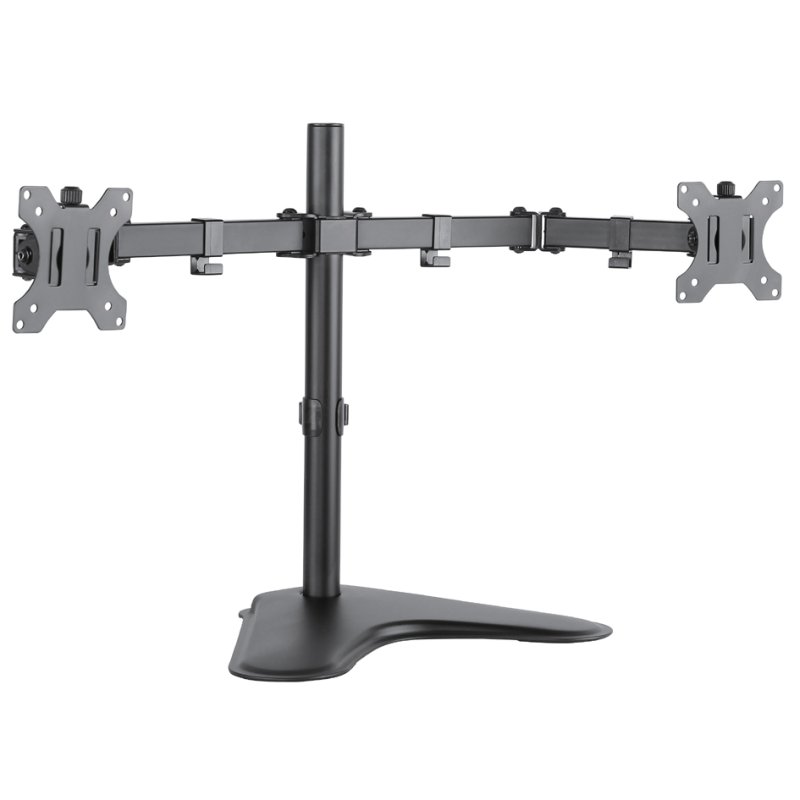
The image may differ from the exact product. Always check the specifications for exact size, colour and features. In the generated lifestyle/demonstration photos (with captions created by XtremeOffice), the scale shown is not always realistic — the product is sometimes deliberately shown large and prominently for recognisability.

LogiLink dual monitor arm with base, black, 13-32 inch, arm length 460 mm
€33,70
incl. VAT
€27,85 excl. VAT (21%)
You are ordering: Colour: black
Price excluding shipping costs: €4,95 incl. VAT for orders under €49,95. From €49,95 we ship for free.
✓ In stock (3 pieces)
Ordered now, delivered Wednesday
Need more? New stock expected in week 47 (16 November - 22 November 2026).
Place your order and we'll make sure it's delivered on time.
Place your order and we'll make sure it's delivered on time.
Brand: LogiLink
This LogiLink product is a German discovery from the XtremeOffice.nl range and is rarely available elsewhere in the Netherlands.
| Article number | 11116192 |
|---|---|
| EAN | 4052792046502 |
| OEM number | BP0045 |
| Weight | 5,000 kg |
|---|---|
| Dimensions | B: 460 mm × H: 130 mm × D: 310 mm |
| Country of origin | China |
| Customs tariff (HS code) | 73269098 |
| VAT rate | 21% |

This is why Dex likes this article
Two screens, completely set to your liking! With this sturdy monitor arm, you effortlessly tilt, rotate and swivel both monitors to the ideal position. Handy for an ergonomic workspace without a cluttered desk.
When do you choose this product?
What does a dual monitor arm do?
A dual monitor arm allows you to set up two monitors side by side without losing desk space to monitor stands. This LogiLink arm supports monitors from 13 to 32 inches and holds each screen firmly with a load capacity of 8 kg per monitor. It gives you an ergonomic workspace where you can position both screens exactly as you find comfortable.
Why choose this base variant?
This monitor arm has a sturdy base stand instead of a desk clamp, which is ideal if you don't have a thick desk edge or don't want to drill a hole. With a mast height of 465 mm and arm lengths of 460 mm, you get enough reach to position both monitors optimally. The steel construction ensures your monitors remain stable, even when adjusting their position.
Flexibility in every direction
The biggest advantage of this arm is the extensive range of motion. You can tilt each screen 45 degrees, swivel it 90 degrees and rotate it 360 degrees. This means you can easily switch between landscape and portrait orientation, or turn a monitor towards a colleague for a discussion. This freedom of movement also helps to reduce neck and back complaints.
Checking compatibility
For mounting, your monitor needs VESA mounting holes of 75x75 mm or 100x100 mm. This standard is found on almost all monitors between 13 and 32 inches, but check your monitor manual to be sure. Also make sure that each of your monitors does not weigh more than 8 kg, otherwise the arm may sag or become unstable.
A dual monitor arm allows you to set up two monitors side by side without losing desk space to monitor stands. This LogiLink arm supports monitors from 13 to 32 inches and holds each screen firmly with a load capacity of 8 kg per monitor. It gives you an ergonomic workspace where you can position both screens exactly as you find comfortable.
Why choose this base variant?
This monitor arm has a sturdy base stand instead of a desk clamp, which is ideal if you don't have a thick desk edge or don't want to drill a hole. With a mast height of 465 mm and arm lengths of 460 mm, you get enough reach to position both monitors optimally. The steel construction ensures your monitors remain stable, even when adjusting their position.
Flexibility in every direction
The biggest advantage of this arm is the extensive range of motion. You can tilt each screen 45 degrees, swivel it 90 degrees and rotate it 360 degrees. This means you can easily switch between landscape and portrait orientation, or turn a monitor towards a colleague for a discussion. This freedom of movement also helps to reduce neck and back complaints.
Checking compatibility
For mounting, your monitor needs VESA mounting holes of 75x75 mm or 100x100 mm. This standard is found on almost all monitors between 13 and 32 inches, but check your monitor manual to be sure. Also make sure that each of your monitors does not weigh more than 8 kg, otherwise the arm may sag or become unstable.

Dex finds with this article
Specifications according to the manufacturer
for monitors 33.02 cm - 81.28 cm (13" - 32"), load capacity: 8 kg each, +/- 45 degrees tiltable, +/- 90 degrees swivel, +/- 180 degrees rotatable, steel construction, max. arm length 460 mm each, compatible with VESA 75 & 100 mm (BP0045)
Specifications
Manufacturer
Hazard information
No hazard classification applies according to the available manufacturer and supplier information.
This product contains no substances classified as hazardous under the CLP Regulation.
This product contains no substances classified as hazardous under the CLP Regulation.
Product information checked by XtremeOffice
This page has been compiled based on information from the manufacturer and our supplier. Last checked on 31-10-2026.
This page has been compiled based on information from the manufacturer and our supplier. Last checked on 31-10-2026.
×
‹
›
![]()