
Everything about shopping at XtremeOffice
From your first search to your return, and everything in between: ordering as a guest or with an account, as a private or business customer, VAT, Dex-Points, gift cards and Pay on receipt. Dex shows you around, with real screenshots of the webshop.
Welcome to XtremeOfficeWho we are, how we work and why that matters to you
XtremeOffice is a Dutch webshop for everything in and around the (home) office: more than 70,000 items from over 300 brands, from ballpoint pens and printer paper to office chairs, ink, coffee and warehouse supplies. Anyone can order from us: private individuals, freelancers, schools, clubs and businesses, with or without an account.
How we work
Our own transport line
From Monday to Thursday we drive to our depot in Trierweiler (Germany) ourselves. In Venlo we check everything and hand it over to the carrier. Shipping takes place from Tuesday to Friday.
Ordered before 12:00
Order from Monday to Wednesday before 12:00 noon and, in most cases, it will be on your doorstep the day after tomorrow.
Dex is here to help
Dex is our digital assistant (AI). He finds items, tracks your order, registers returns and passes you on to a human when needed.
No prying eyes
No Google Analytics, no Facebook pixel, no advertising trackers. We store your name, address and phone number encrypted, exclusively on servers in the EU.
The Netherlands and Belgium
We deliver in the Netherlands and Belgium. The webshop is available in Dutch, French and English.
Personal
No call centre: just a small team in Venlo. If Dex can't work it out, Maurice, the owner, takes a look himself.

Hi, I'm Dex! In this manual I'll walk you through the whole webshop. You don't have to read it from cover to cover: use the table of contents to jump straight to what you need. And if you spot a green box with a calculator, go ahead and try it, nothing can go wrong.
How to use this manual
- Online (xtremeoffice.nl/handleiding) you get the table of contents on the left (on your phone, the ☰ Contents button at the bottom), short explainer videos from Dex and interactive calculators: when will my parcel arrive, how many Dex-Points will I earn, how much VAT do I pay?
- As a PDF you can save it, print it or forward it to a colleague who handles purchasing.
- Some screenshots have numbered dots. Hover over them with your mouse (or tap them) for an explanation; the same explanation appears as a list below the image.
- Boxes marked 🏢 are about ordering as a business, boxes marked 🇧🇪 are about ordering from Belgium.
The customer journey at a glanceFrom idea to parcel on the doormat, and what comes after
This is what an order looks like from start to finish. Each step has its own chapter further on; click More to jump there.

You look for what you need
Type an item, brand or item number, describe what you're looking for in plain words, take a photo or ask Dex. Or browse the categories, the brands and the Toner & Ink Finder. Got a whole list? Let Dex fill your basket in one go.
More →You view the item
Price including and excluding VAT, stock, expected delivery day, specifications, Dex's explanation, reviews and sometimes a video in which Dex puts the item to the test.
More →In the basket
You can see straight away how much more you need for free delivery (from €49.95), and you get a few smart suggestions that go well with your items.
More →As a guest or with an account
Fill in your details, choose delivery or collection in Venlo, and choose how you pay: straight away via Mollie or (if you qualify) Pay on receipt.
More →Order confirmation
Within a few minutes you receive an e-mail with your items, the expected delivery day, a usage tip from Dex for each item and, for hazardous substances, the safety data sheet.
More →Invoice and track & trace
As soon as your parcel leaves, you receive the invoice with the tracking link. E-mails from the carrier (for example a PIN code for a parcel locker) are forwarded to you with your codeword.
More →Your parcel has arrived
You receive a delivery e-mail. If by 21:00 on the promised delivery day the carrier still hasn't reported a delivery, Dex asks you, with a single click, whether everything arrived safely.
More →Points, a review and perhaps a return
With an account, your Dex-Points are added to your balance. A few days after delivery we ask you for a review. Not quite right after all? You can register a return within 14 days of receipt.
More →Search & discoverHow to find what you need quickly, even if you don't know exactly what it's called

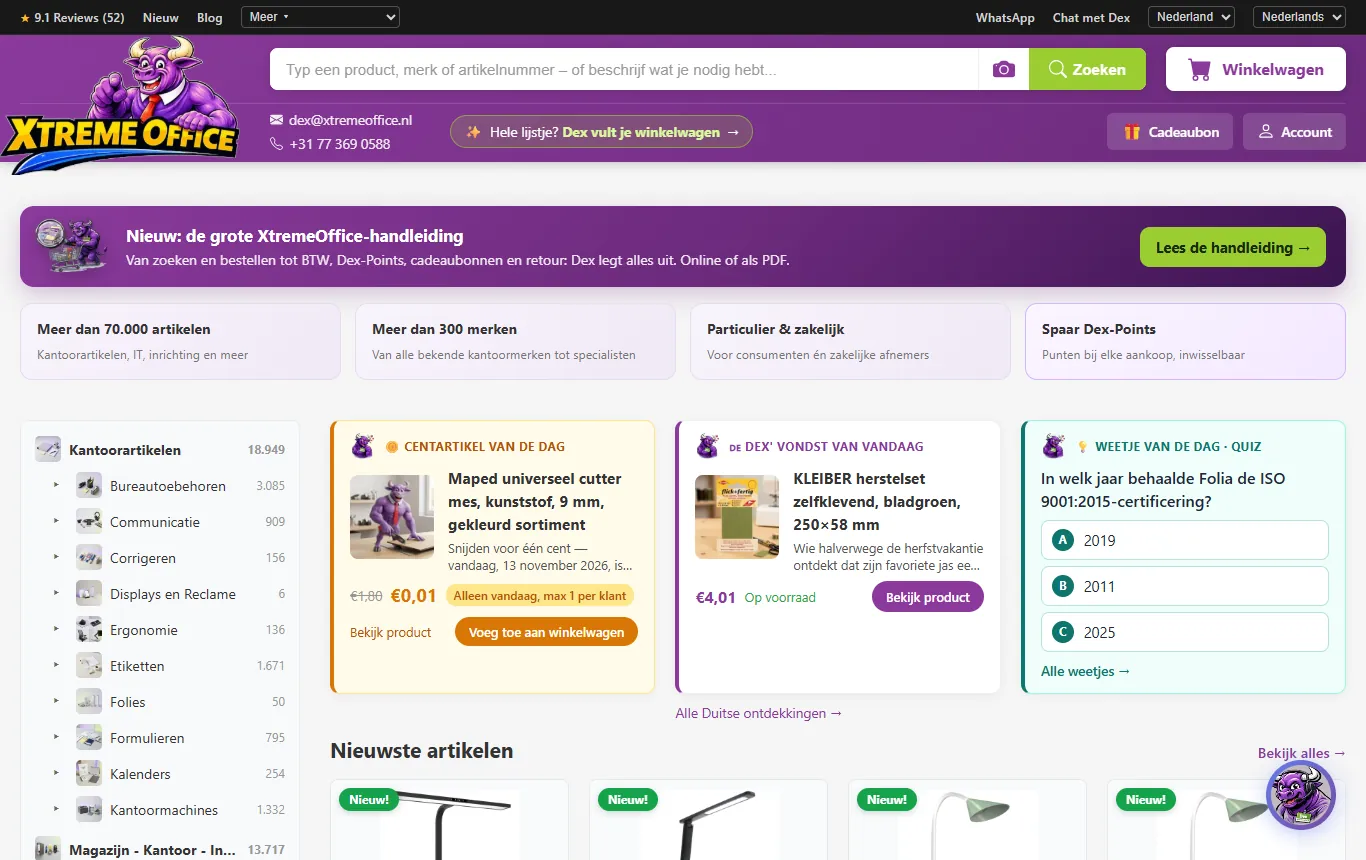
- 1Search bar: type an item, brand, item number, EAN or simply what you need.
- 2Camera: search with a photo of the item (for example an empty cartridge).
- 3Whole list? Dex fills your basket: type or photograph your shopping list and Dex finds everything in one go.
- 4Basket: the red dot shows the number of items.
- 5Buy or give a gift card.
- 6Account: log in, register or go to My Account.
- 7Choose your country (Netherlands/Belgium) and language (Dutch, French, English) here.
- 8WhatsApp and Chat with Dex: ask a question straight away.
Searching with the search bar
The search bar is smarter than it looks. You can search by:
- Product name or brand: ballpoint pen, Stabilo Boss, office chair.
- Item number, EAN code or cartridge number: these are recognised instantly.
- Plain language: something to tidy away the cables under my desk. For longer sentences, an AI layer works out what you mean. Ask for several things at once and they are split up. If it's too vague, Dex opens the chat so you can search together.
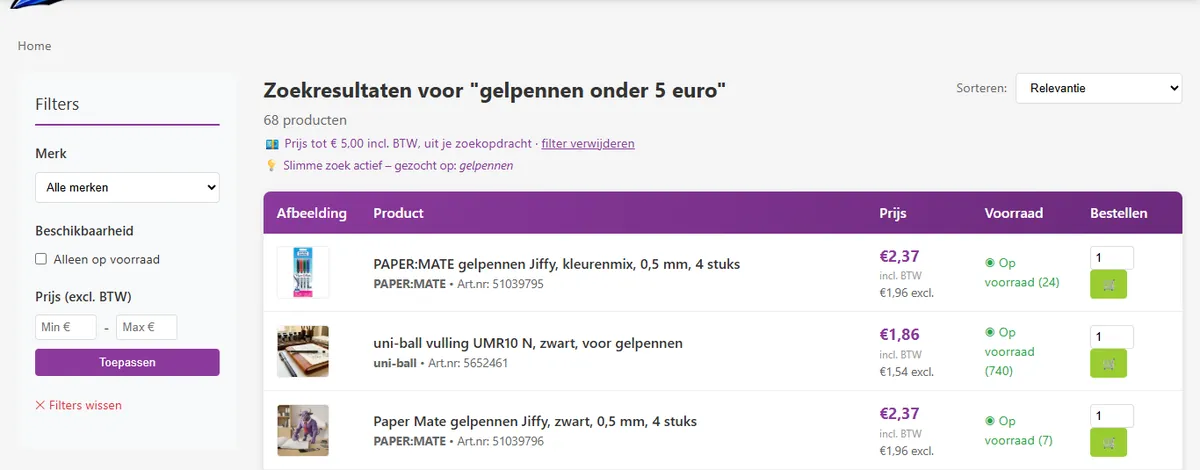
- With a price limit: gel pens under 5 euros sets a price filter automatically. You'll see a notice with a link to remove the filter again.
- With a printer model: type a known printer model and the matching cartridges appear at the top.
We catch typos, plurals and compound words (kantoorstoel → kantoor + stoel) as far as possible.
Search by photo 📷
Click the camera in the search bar (or in the Dex chat) and take or choose a photo. We recognise the object in the foreground and search for it straight away; a readable barcode (EAN) becomes the search term itself. The photo is not stored.
Dex fills your basket: your whole list in one go 🛒
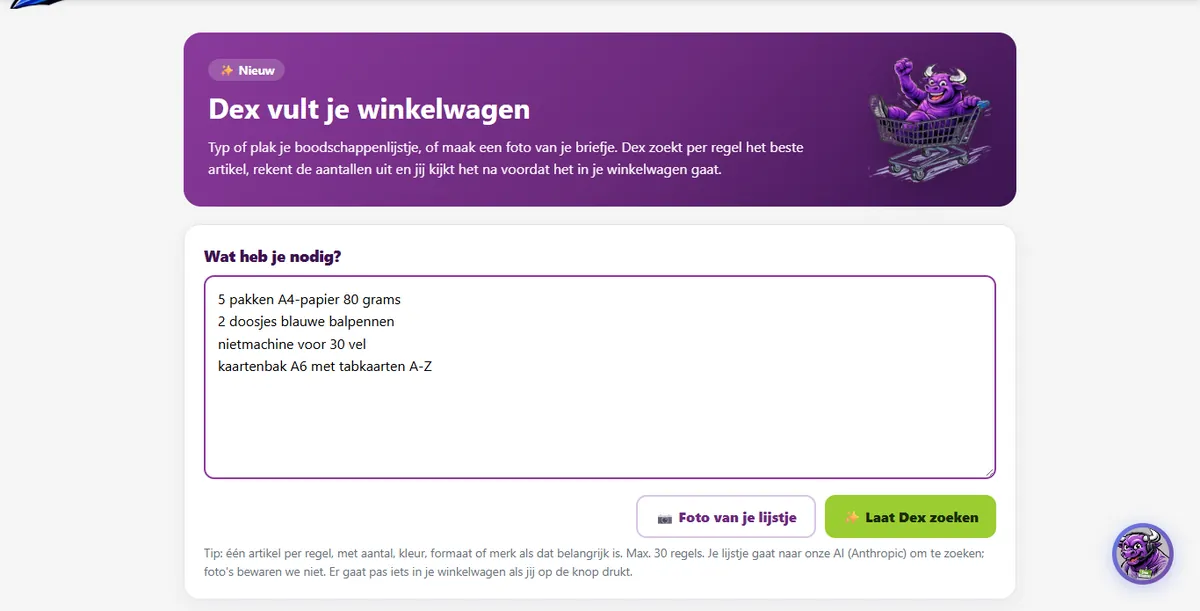
Got a shopping list for the office? Then there's no need to search for everything separately. Click "Whole list? Dex fills your basket" below the search bar, or go to xtremeoffice.nl/lijstje.
- Type or paste your list, one item per line. Add whatever matters: quantity, colour, size, weight or brand. For example "5 packs of A4 paper 80 gsm" or "2 boxes of blue ballpoint pens". A maximum price works too: "coffee beans under 20 euros".
- Or take a photo of your (handwritten) note with 📷 Photo of your list. Dex copies it into the text box so you can check it first. We don't keep the photo.
- Click ✨ Let Dex search. Dex reads your list, searches the entire range line by line and picks the best-matching item. This usually takes 15 to 30 seconds.
- Check everything. For each line you see what you wrote, what Dex chose (with price and stock), the quantity and two alternatives. Click "Prefer these?" to switch, adjust the quantity or switch a line off.
- Click 🛒 Add to basket. Only then does everything go into your basket, and you check out there as usual.
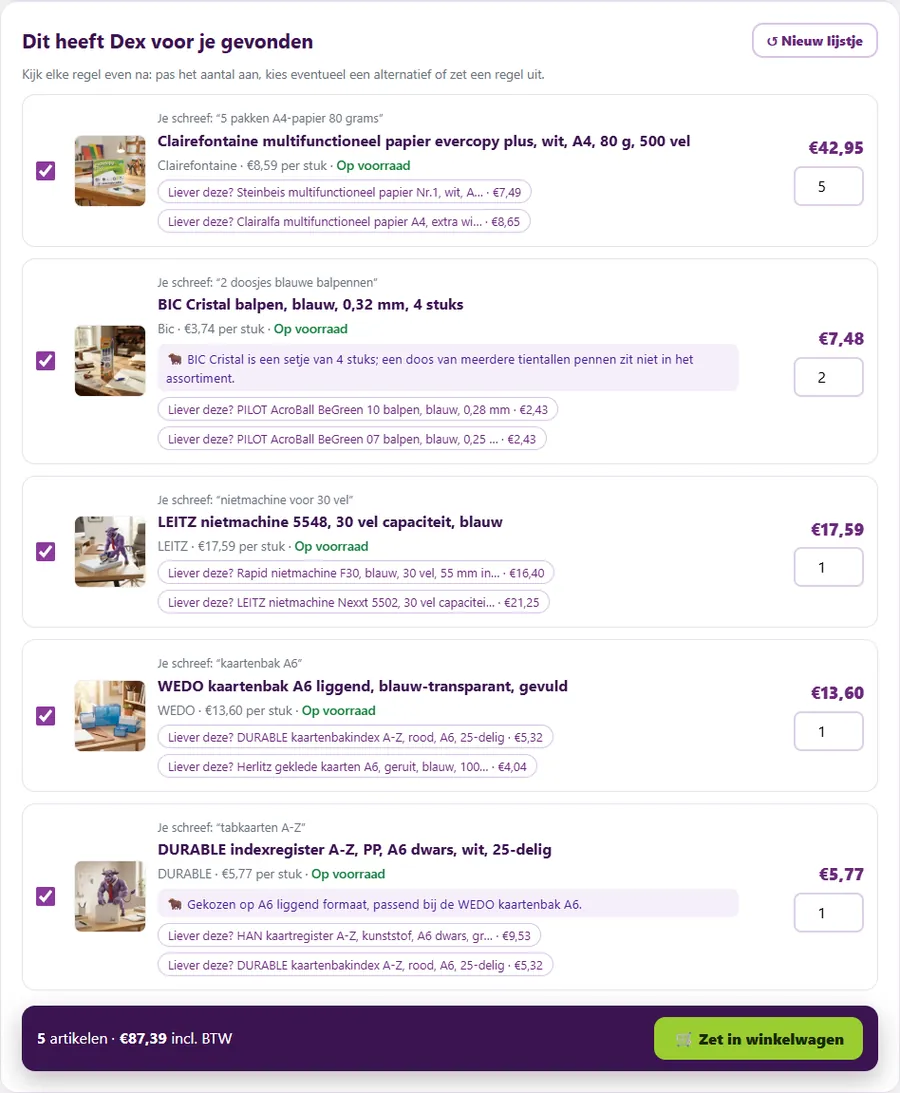

I convert the quantities for you. Ask for "4 rolls of sticky tape" and I have a 4-pack? Then I add 1 pack. If an item is only sold in tens, I round up to 10, 20, 30… And if I can't find something, I'll tell you honestly so you can carry on searching yourself.
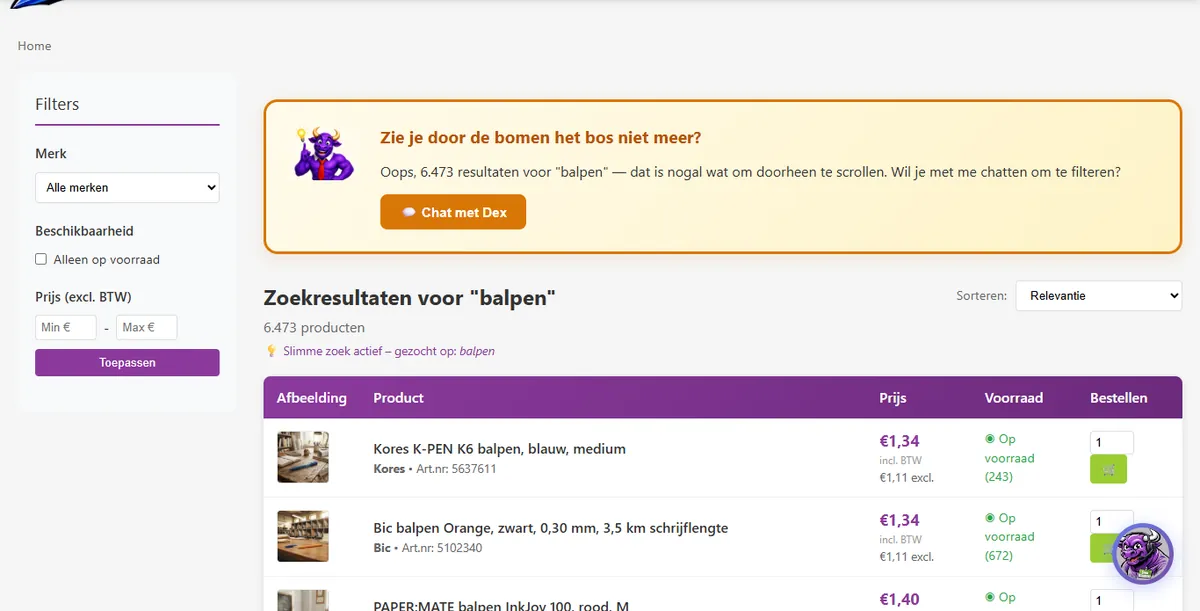
Filters and sorting
To the left of the results you can filter by brand, availability (in stock only) and price. For many product groups you can also filter by specifications such as colour, paper size, size and capacity. You can sort by relevance, name, price (low to high or high to low), stock and brand. You get 25 results per page.
Categories, brands and special pages
Categories
On the left of the homepage you'll find the full category tree, with the number of items in each group. Click through until you find the right group.
🏷️Brands
All brands at a glance, with logos, a live filter and fun facts about the brands.
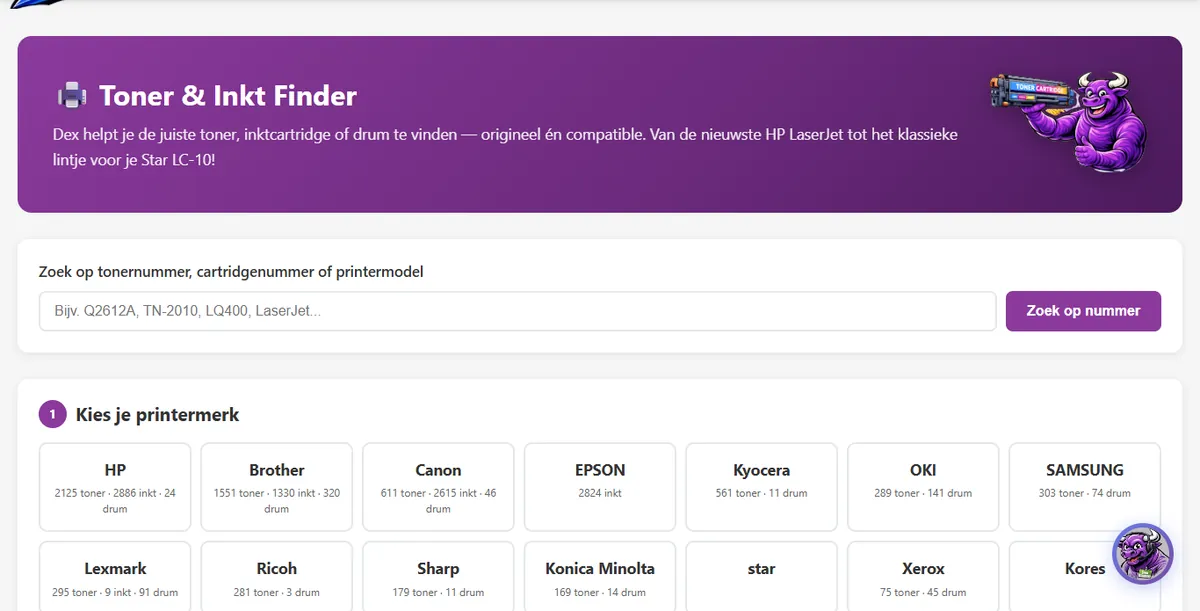
🖨️Toner & Ink Finder
Choose your printer brand and model, or search by cartridge number. Original and compatible are shown side by side, with an XL badge and page yield.
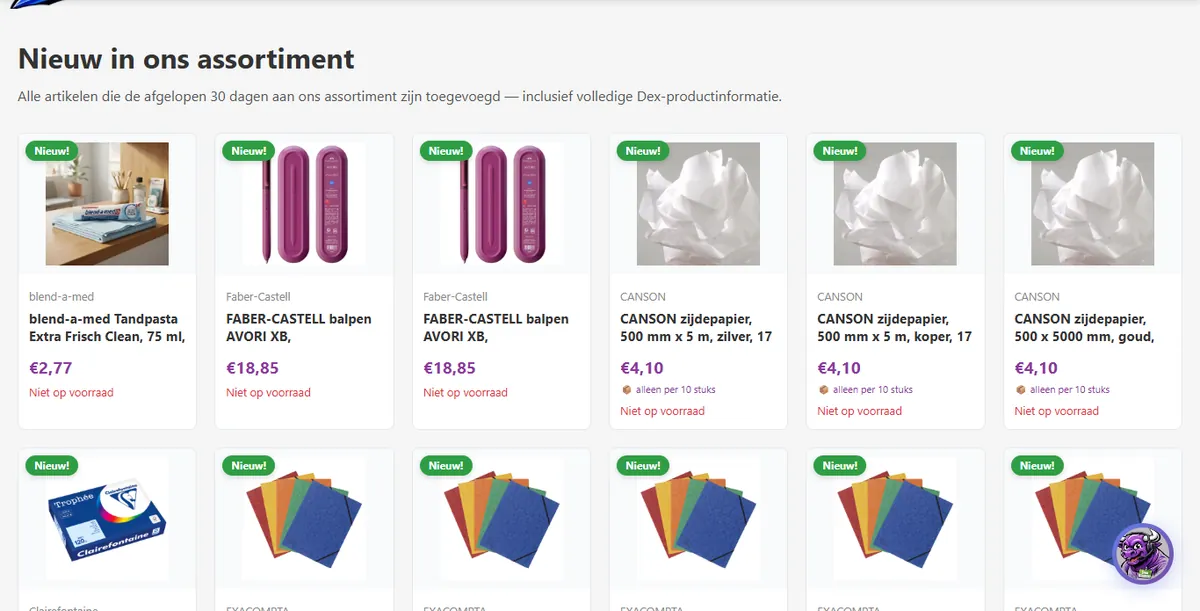
🆕New
All items added to the range in the past 30 days.
🇩🇪German Discoveries
Brands found on every desk in Germany but hardly available in the Netherlands.
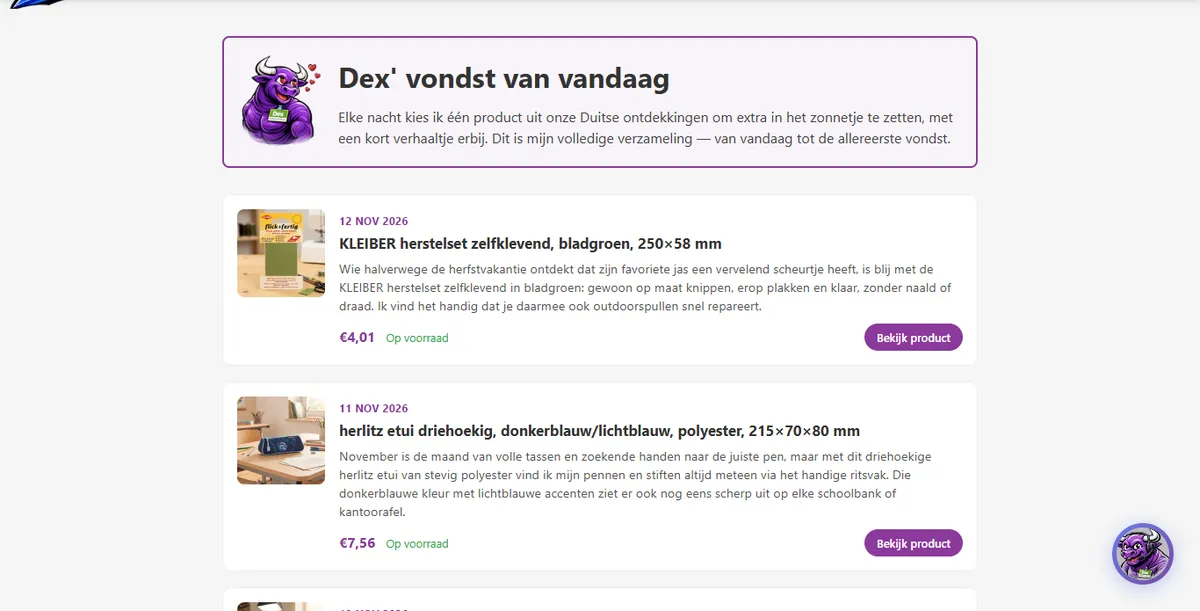
🔍Dex's find of the day
Every day Dex puts one special item in the spotlight, with a short story to go with it. The full archive is online.
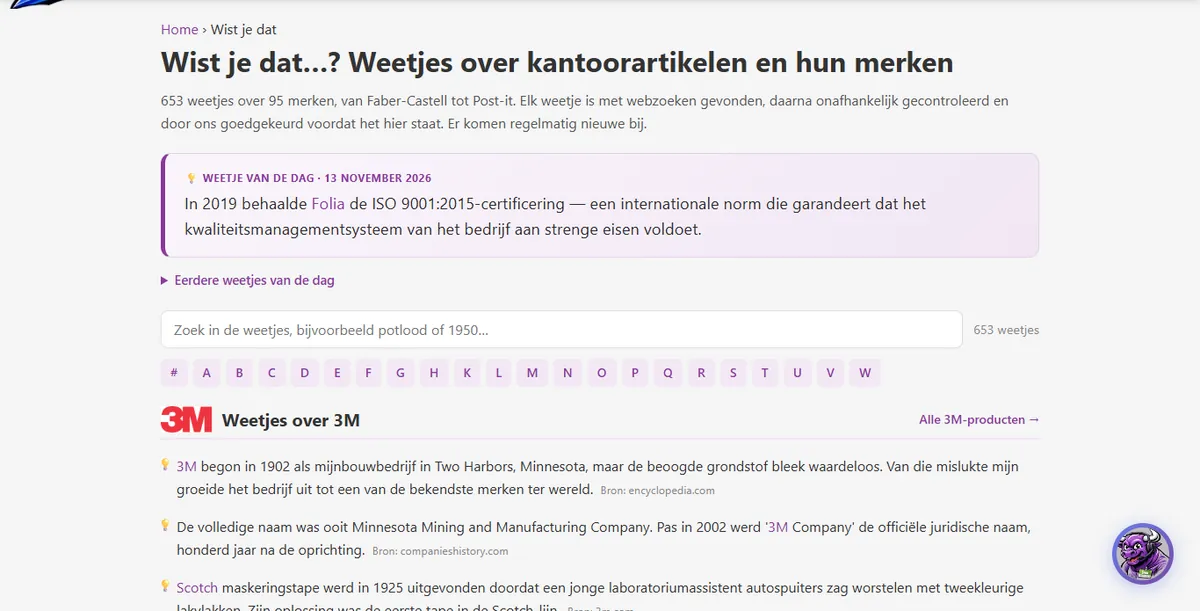
🧠Fun facts and quiz
Hundreds of checked facts about office supplies and brands, plus a quiz question on the homepage every day.
✍️Dex's blog
Tips, explanations and stories about products and office life.
The one-cent item of the day (€0.01)
Every day Dex picks a handy item that you can buy that day for one cent (incl. VAT). You'll see it on the homepage and sometimes as a suggestion in your basket.
- You get a maximum of 1 for €0.01 per basket; a second one costs the normal price.
- The offer applies on that day only and while stocks last. At midnight a new item is ready and waiting.
- The normal shipping rules still apply. So it's mainly a fun little extra with an order.

My favourite little trick: take a quick look at the one-cent item and the fact of the day on the homepage every morning. You learn something, and sometimes you pick up an eraser or a pen for a cent. 😄
Games
Time for a break? At the bottom of every page, under Information, you'll find the games Hangman and Yahtzee. And Dex himself has a few secrets too. Try challenging him in the chat and see what happens…
The product pageEverything you see on an item page, explained
The product page is where you make your decision. At the top is the buy box with the price, quantity and the basket button. Below it you'll find specifications, explanations, reviews and suggestions. Hover over the numbers for an explanation.
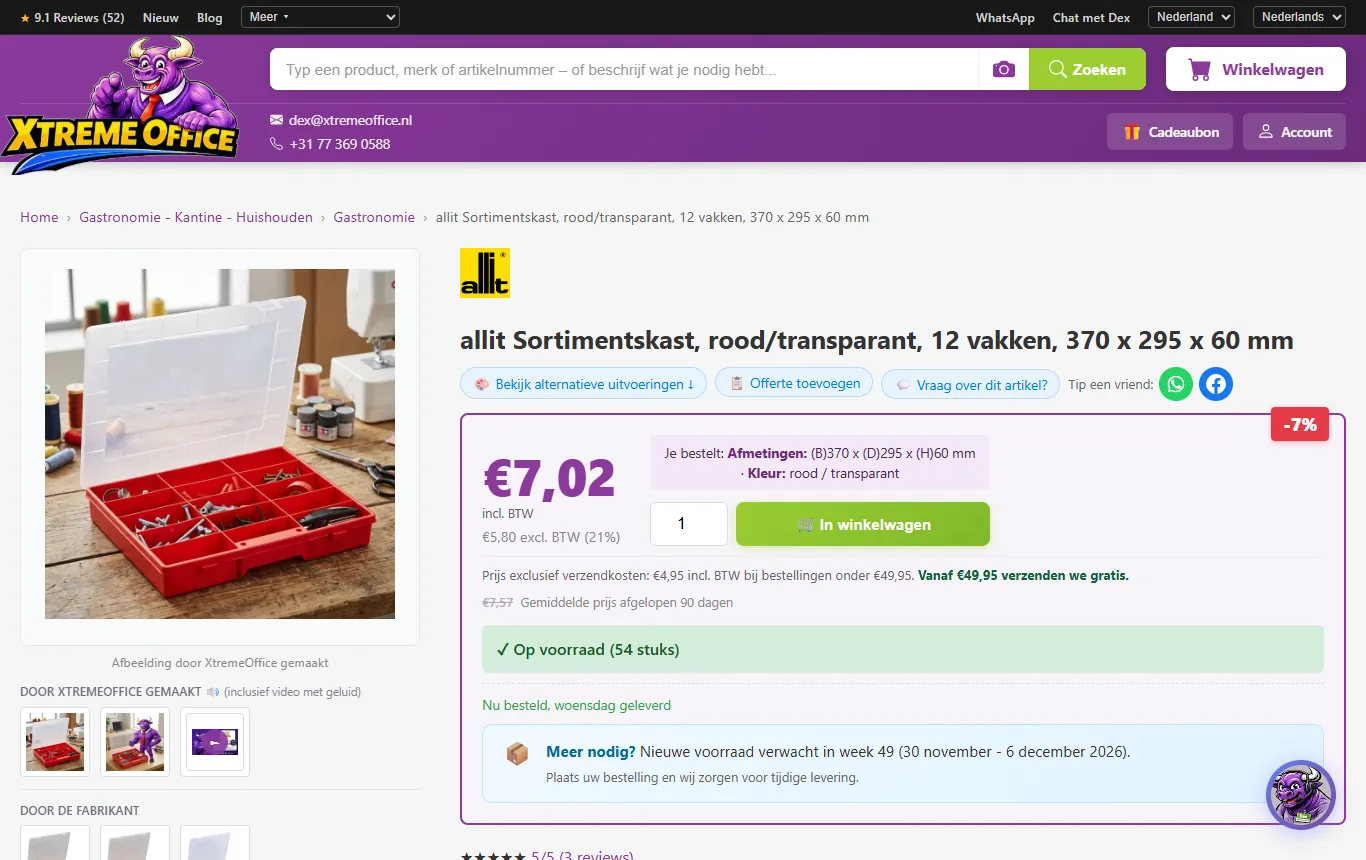
- 1Breadcrumb: the category the item belongs to. Click to browse back.
- 2View alternative versions: other colours, sizes or packs of the same item.
- 3Add to quote: puts the item on your quote list (handy for the purchasing department).
- 4Question about this item: Dex answers your question about exactly this product.
- 5Recommend to a friend: share the item via WhatsApp, Facebook, e-mail or a link. You send it yourself; we don't send anything.
- 6Price including VAT (large) and excluding VAT with the VAT rate (small).
- 7Discount label: the price is more than 3% below the average of the past 90 days (that average is shown struck through below the price).
- 8"You are ordering": the colour and size you are ordering. Check this, especially if you clicked on a photo of a different colour.
- 9Quantity and Add to basket. For items sold per pack, the quantity counts in pieces, in steps of the pack size.
- 10Delivery costs: €4.95 incl. VAT, free from €49.95 in products.
- 11Stock: how many pieces are available for immediate delivery.
- 12Expected delivery day if you order now.
- 13Need more than is in stock? This shows the week in which new stock is expected.
- 14Created by XtremeOffice: lifestyle photos, a photo of Dex using the item and sometimes a video (with sound).
Prices: including and excluding VAT
For every item you see the price including VAT (large) and excluding VAT (small, with the rate). Private customers look at the first, business customers often at the second. There is no separate business price list: everyone pays the same price. In the Netherlands the rate is usually 21%, or 9% for food. If you order from Belgium, you'll see the Belgian rate (see chapter 9).
Pack sizes: "only per N pieces"
We sell some items only per pack, for example per 10 pieces. The buy box then says: "We only sell this item per 10 pieces — the price applies per piece."
- The price shown is always the price per piece.
- The quantity field counts in pieces, with the pack size as the minimum and the step size: 10, 20, 30…
- So nothing is ever multiplied: entering 30 means 30 pieces, even if the title says "10 pieces".
Does the title say "3 pieces" and you order 3? Then you get 3 pieces, not 9. The price and the quantity are always per piece. Not sure? Check the total price in your basket, that's always right.
Stock, delivery time and back orders
- In stock (green): available for immediate delivery, with the number of pieces.
- Delivery day: "Ordered now, delivered Wednesday". That day takes the time of ordering into account (see the delivery time planner in chapter 10).
- Not (enough) in stock? You can usually still order. You'll see the week in which new stock is expected. Whatever is in stock we send straight away; the rest follows free of charge as a back order.
- Notify when in stock: for some items you can ask to be e-mailed as soon as they are back in stock.
- Discontinued item: you can only order this while the last stock lasts; we no longer reorder it.
Explanations, specifications and documents
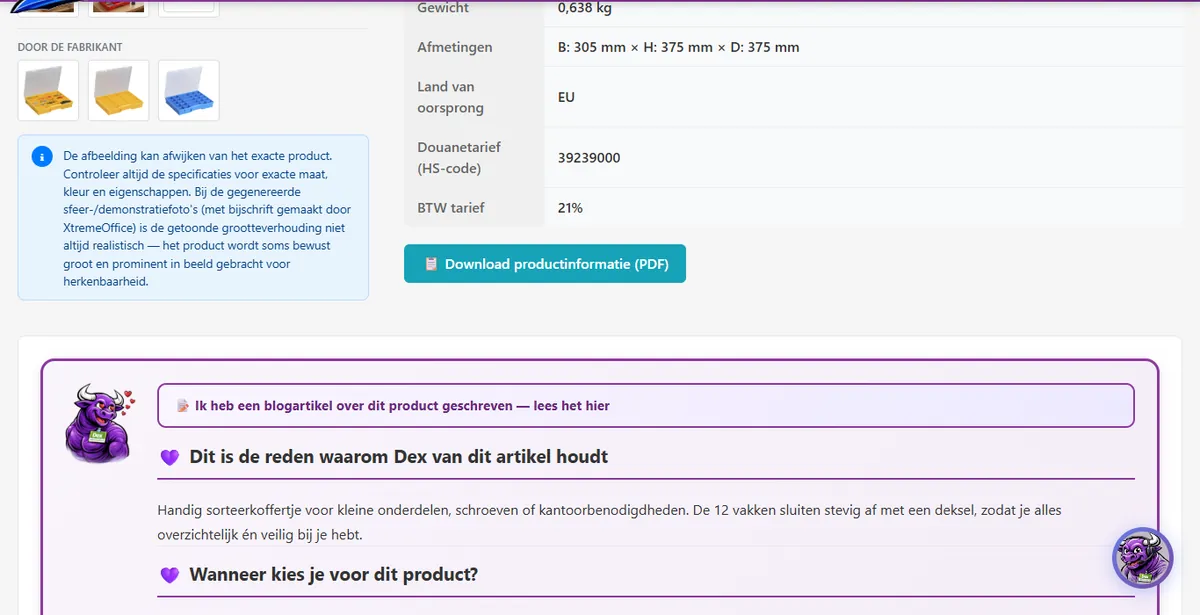
- The manufacturer's description plus Dex's own text: why you'd choose the item and when it comes in handy.
- Specification tabs with all technical data, item number, EAN and pack size.
- Product information as a PDF: a datasheet we create for you on request.
- Dex knows: a short usage tip for many items.
- Manufacturer or importer: at the bottom of the page you'll find the manufacturer's name, address and (usually) e-mail address. For own brands and unbranded items this is the importer within the EU; the heading then says "Importer".
- Safety: for hazardous substances, the hazard pictograms and H and P statements, plus the safety data sheet as a PDF. We also send that sheet with your order confirmation.
- Nutrition and allergens: for food items we only show ingredients and allergens if they come word for word from the manufacturer. Sometimes they come from the open database Open Food Facts, in which case it is shown as the source. If you have an allergy, always read the packaging too.
Photos and "Dex keurt" videos
Below the main photo there are two groups: Created by XtremeOffice (lifestyle photos, a photo of Dex using the item, and for more and more items a "Dex keurt" video of about 25 seconds with sound, in which Dex puts the item to the test) and By the manufacturer (the official product photos).
Reviews and suggestions
- Reviews: stars (1–5) with comments from customers who bought the item. Dex responds to every review.
- Fits well: complementary items that go with this product, with a short reason why.
- Alternative versions and matching accessories: the same item in a different colour, size or pack comes first, followed by the accessories. For some versions a small arrow (→) briefly shows what's different, for example "length: 2 m".
- This goes well with it: for index cards, card index boxes and tab cards you can see which items have the same size and the same orientation (portrait or landscape), so that everything fits together.
Special items
The basketCollect, check and see how much more you need for free delivery
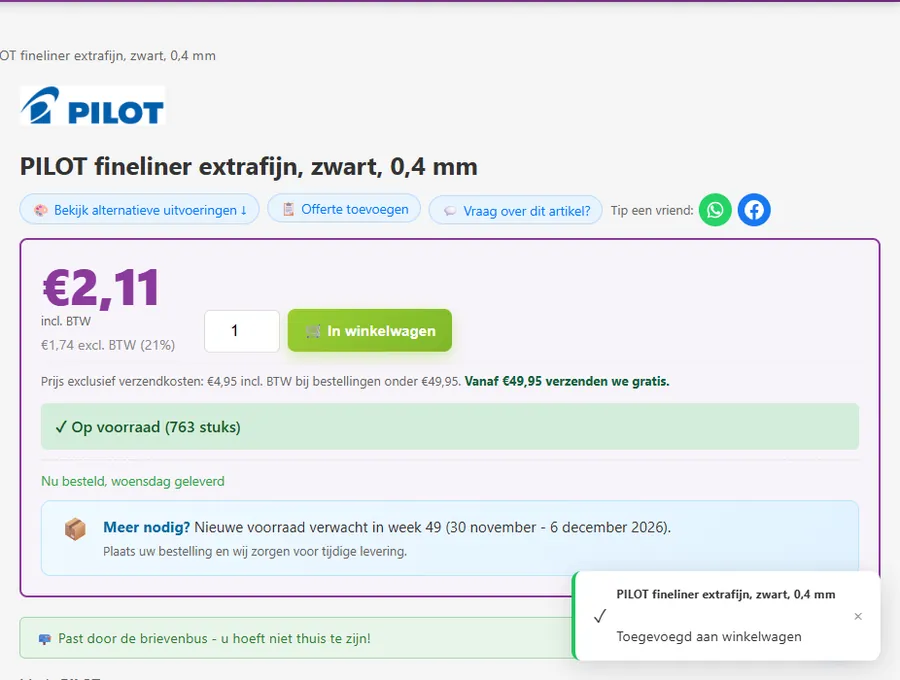
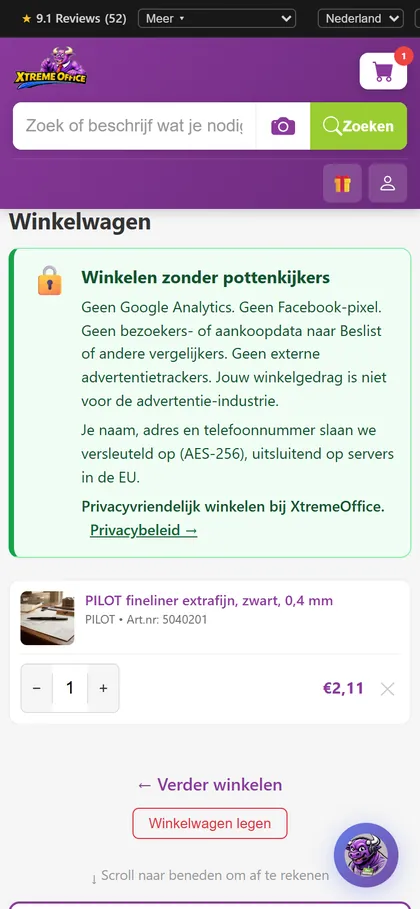
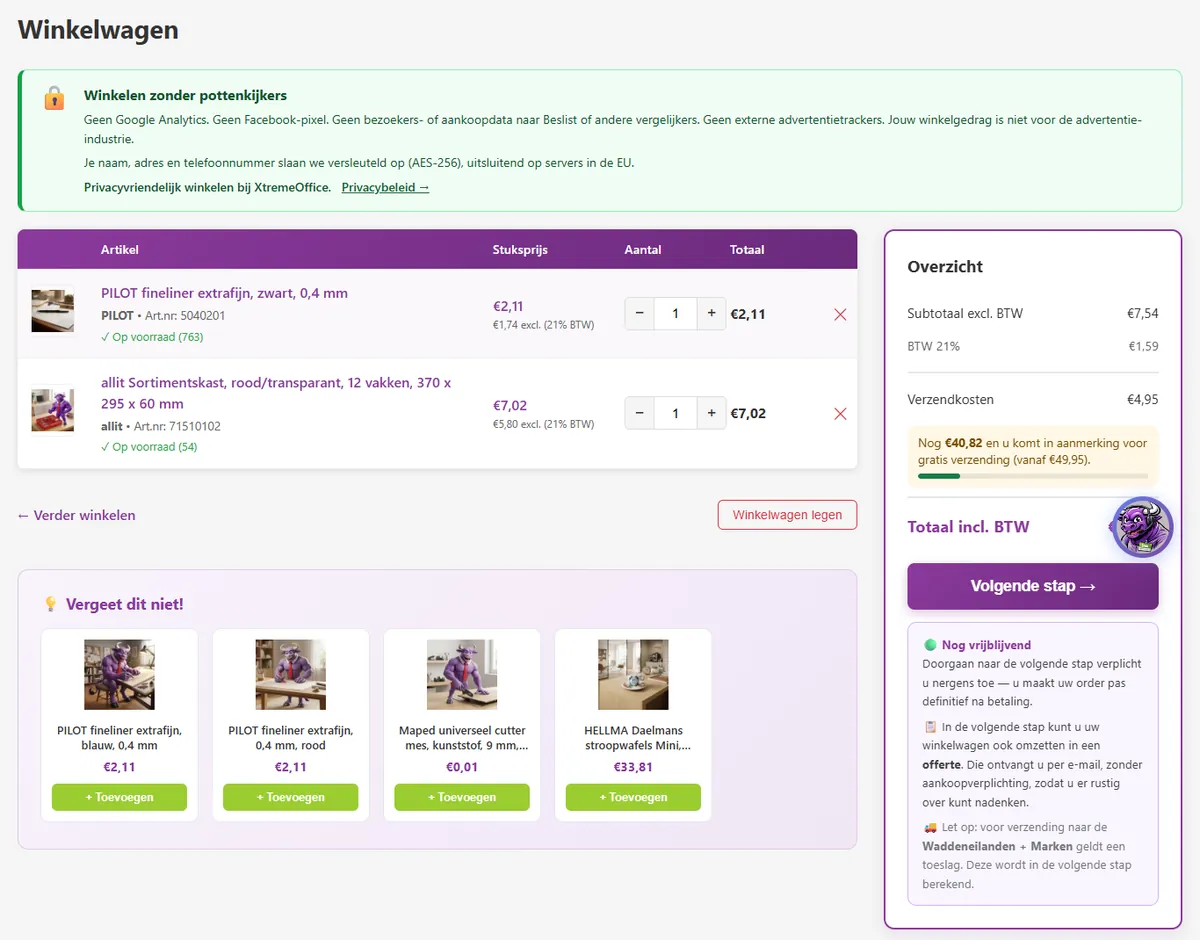
- 1Shop without prying eyes: no tracking, your details encrypted in the EU.
- 2Change the quantity with − and +. For items sold per pack, this goes in steps of the pack size.
- 3Remove item.
- 4Just € … more and your delivery is free: the bar fills up to €49.95.
- 5Next step: on to checkout. Still without obligation, your order only becomes final when you pay.
- 6In the next step you can also turn your basket into a quote.
- 7Empty basket: remove everything in one go.
- 8Don't forget this: suggestions that go with your items, added with a single click.
Handy to know
- A basket holds a maximum of 50 different items, and a maximum of 100 pieces per item. Need more? Request a quote or special offer (chapter 16).
- Prices and stock are rechecked with every change, so you never check out at the wrong price.
- Your basket is kept for as long as your browser session lasts. If you leave without checking out, it may be empty after a while. Want to save a list? Turn it into a quote.
- If your account comes with a personal discount, you'll see it as discounted lines with an explanation.
- See a yellow notice at the top? Then the basket has spotted something worth double-checking, for example a keyboard with a German or French layout, or index cards and a card index box whose sizes don't match.
- With 350 Dex-Points you can exchange your points for free delivery at checkout. You'll already see that offer in the basket.
Just a few euros short of free delivery? Have a look at Don't forget this: you'll find items there that genuinely go with your order, like an eraser with your pencils. Never just "something expensive". 😉
Account or guest?Both are fine. Here are the differences, and how to create an account
You don't need an account to order. A guest order is done in no time. With an account, though, you get more convenience and more benefits.

| What | As a guest | With an account |
|---|---|---|
| Ordering and paying | Yes | Yes |
| Order confirmation, invoice and track & trace by e-mail | Yes | Yes |
| Collection in Venlo | Yes | Yes |
| Pay on receipt | Yes, if you meet the conditions | Yes, if you meet the conditions |
| Registering a return | Via the link in your order confirmation, or via Dex | Via the link, via Dex or in My Account |
| Earning your own Dex-Points | No, your points go to the Dex pot for a good cause | Yes, 4 points per euro + 50 welcome points |
| Order history, finding invoices, reordering | No | Yes |
| Cancelling an item yourself as long as the order hasn't been processed yet | No, ask Dex | Yes |
| Store credit, redeeming a gift card | No | Yes |
| Final quote and special offer | Quote list yes, finalising no | Yes |
| Freight transport, reverse-charge VAT (Belgium) | No | Yes, with a KVK/VAT number |
| Personal codeword in all our e-mails | No | Yes |
| Linking WhatsApp so Dex recognises you | No | Yes |
Creating an account
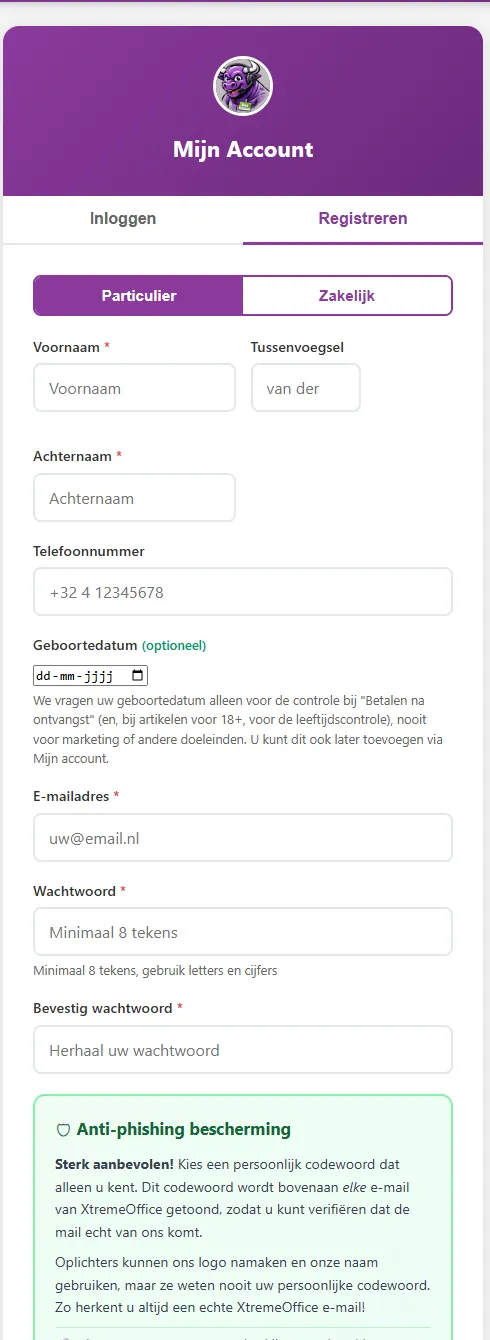
- Click Account at the top right and choose the Register tab.
- Choose Private individual or Business. If you choose business, enter a Dutch Chamber of Commerce (KVK) number or VAT number. We check a VAT number instantly against the European VIES database.
- Enter your name, phone number and e-mail address and choose a password. Your date of birth is optional, but needed for Pay on receipt (private individuals) and for 18+ items.
- If you like, choose an anti-phishing codeword straight away (see below).
- Done: you receive 50 welcome points.
My Account: all the tabs
Overview
Your latest orders, balance and points at a glance.
My details
Name, phone, business details (KVK/VAT), your codeword and the link with WhatsApp.
Addresses
Up to 5 delivery addresses, with automatic completion from the postcode.
Orders
Status, tracking links, invoices, reordering, cancelling items while that's still possible, and the return button up to 16 days after dispatch.
Store credit
Your balance and all transactions. Top up and request a refund.
Dex-Points
Your points, when they expire, and converting them into credit, a gift card, a donation, or sending points to someone.
Gift cards
Gift cards you bought or received, and redeeming a gift card.
Quotes
Your quotes and quote lists, including ones you haven't finalised yet.
Pay on receipt
Outstanding and paid items, with the amount, the payment deadline and a pay button.
Password
Change your password.
The anti-phishing codeword 🛡️
Choose a personal codeword in My details. We put it at the top of every e-mail we send you. A scammer can copy our logo, but doesn't know your codeword. If an e-mail "from us" is missing the codeword, don't click on anything and forward the e-mail to dex@xtremeoffice.nl.
Forgotten your password
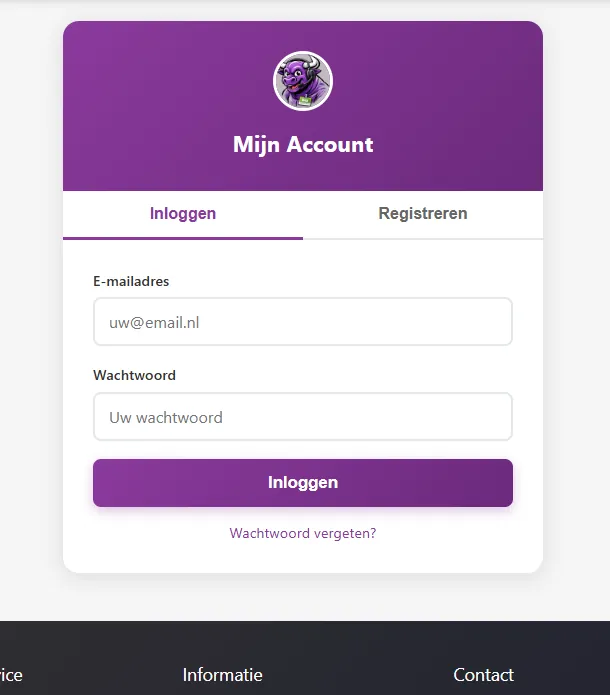
On the login page, click Forgot your password? and enter your e-mail address. You'll receive a link that is valid for 2 hours and only works once. For your security you always get the same message, even if we don't know the address. After a few failed login attempts we temporarily block logging in.
Ordered as a guest first? You can still create an account later
If you order as a guest, the next working day you receive a one-off e-mail with a link to xtremeoffice.nl/account-aanmaken (valid for 30 days). If you create an account with it, we link all your earlier guest orders with the same e-mail address to it. That way you can find them again, return items and download invoices. There's no obligation at all. Points from earlier guest orders do stay in the Dex pot, though.
Deleting your account or details
You have the right to access and delete your data. Send an e-mail to dex@xtremeoffice.nl. Anything we're legally required to keep (such as invoices), we keep for as long as the law requires. More in chapter 18.
Checking out step by stepFrom "Next step" to "Place order with payment obligation"
In your basket, click Next step. If you're not logged in, you first choose: log in, create an account or order as a guest. After that, it's all on one clear page.
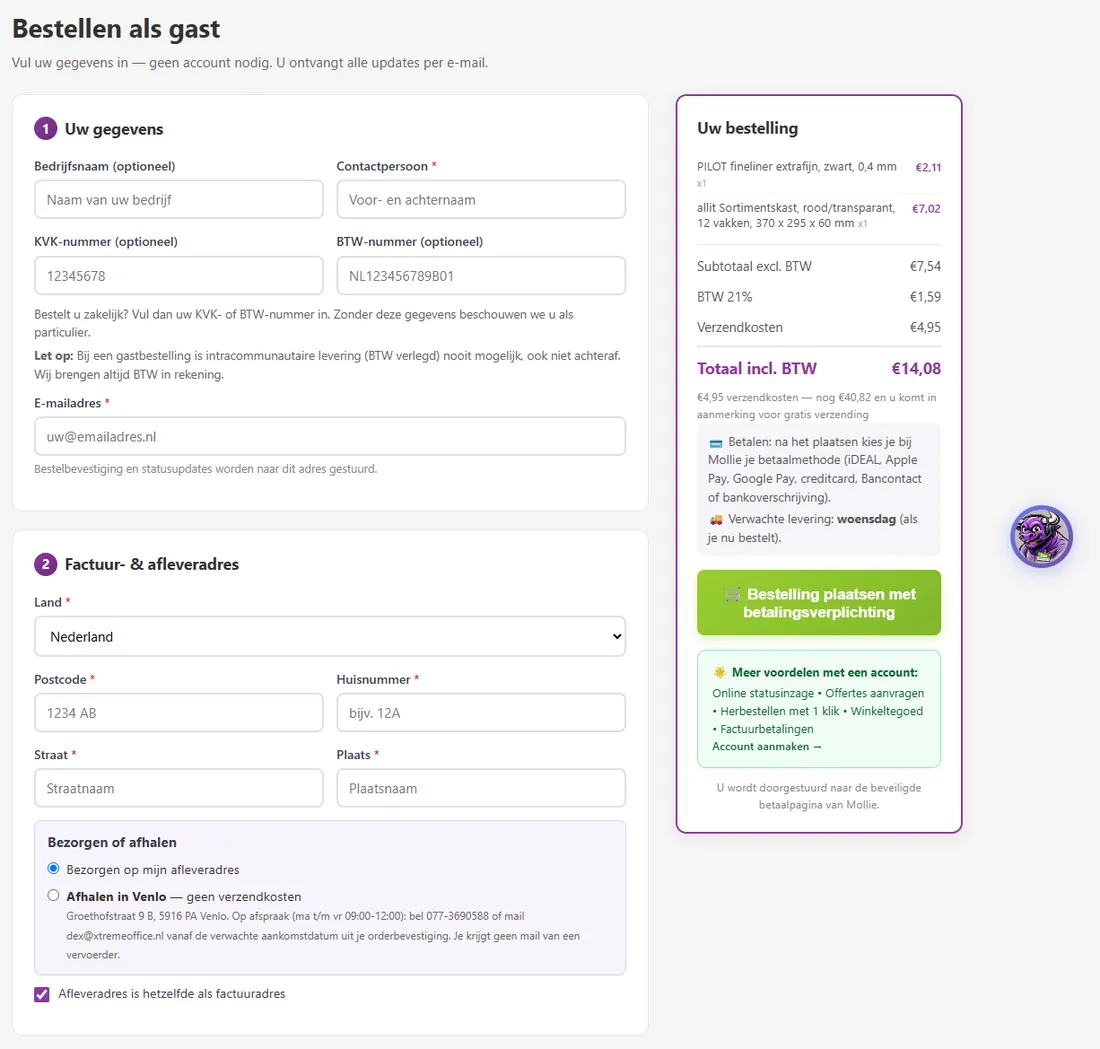
- 1Chamber of Commerce (KVK) or VAT number (optional). Fill one in and you order as a business; otherwise as a private customer.
- 2Email address: this is where your confirmation, invoice and status emails go.
- 3Postcode and house number: we fill in the street and town for you (Netherlands).
- 4Delivery or Pick up in Venlo (pick-up = no shipping costs).
- 5Your summary: subtotal, VAT, shipping costs and the total. All recalculated by our server.
- 6The order button. After that, you choose how to pay at Mollie.
- Your details: name, email address and, if applicable, company name, Chamber of Commerce (KVK) number and VAT number. If you're logged in, everything is already filled in.
- Address: enter your postcode and house number; we add the street and town. Delivery address different from your billing address? Untick the box. With an account, you choose from your saved addresses.
- Delivery or pick-up: choose Pick up in Venlo and you never pay shipping costs.
- Payment method: Pay immediately via Mollie or, if you're eligible, Pay on receipt. With an account, you'll also see your store credit here and can trade in Dex-Points for free shipping if you like.
- Other details: your own reference or project code (it appears on your confirmation and invoice) and, if you wish, the newsletter.
- Tick the box to agree to the general terms and conditions and click Place order with payment obligation.
- With Pay immediately, you go to Mollie's secure payment page and choose iDEAL, credit card and so on there.
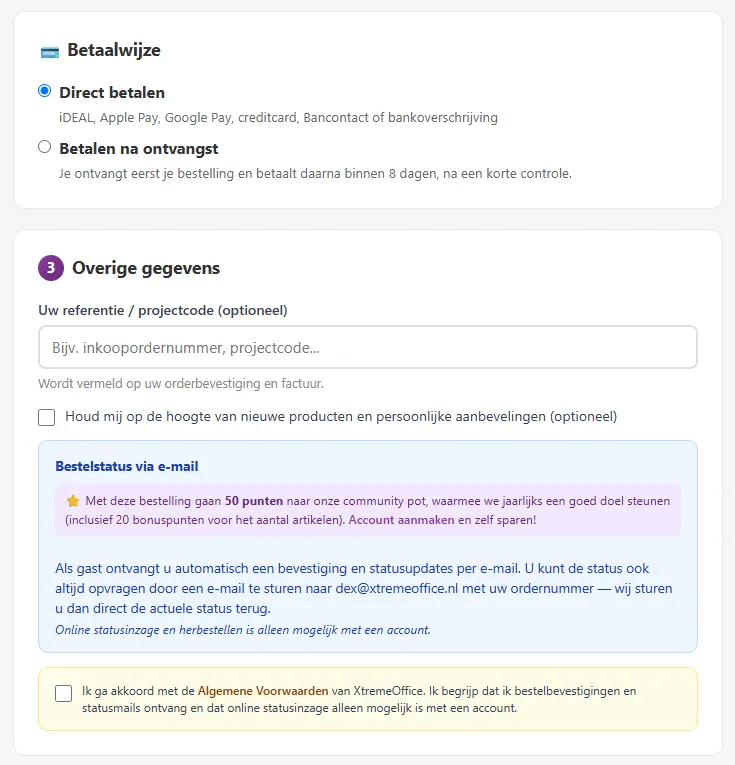
- 1Pay immediately: iDEAL, Apple Pay, Google Pay, credit card, Bancontact or bank transfer via Mollie.
- 2Pay on receipt: receive first, pay within 8 days (after a quick check).
- 3Your own reference, such as a purchase order number or project code.
- 4Newsletter: only if you tick the box yourself.
- 5As a guest, the points for your order go to the Dex pot for a good cause.
- 6Agreeing to the general terms and conditions is required.
Why the button says "with payment obligation"
It's a legal requirement in the EU: you need to be able to see that this click places an order you have to pay for. Until that moment, nothing is binding.
What we check for you during checkout
- Address check (Netherlands): if you enter a street or town that doesn't match the postcode, you'll get an orange warning and have to confirm that the address is correct. That way your parcel doesn't end up in the wrong place.
- Duplicate orders: if you accidentally click twice, we only place your order once.
- Prices and stock are recalculated one last time just before the order is placed.
- Age for 18+ items (see chapter 4).
- Checkout bargain: sometimes the checkout suggests one item that really belongs with your order and that you're still missing. That's all.
Pick up in Venlo

At checkout, choose Pick up in Venlo. You then never pay shipping costs and you won't get any emails from a carrier. As soon as your order has arrived with us, you'll receive the invoice with a note that it's ready for collection.
- Address: XtremeOffice, Groethofstraat 9 B, 5916 PA Venlo, the Netherlands.
- By appointment, Monday to Friday in the morning. Reply to the invoice email with the day and time you'd like to come; Dex will confirm your appointment by email. You can also call: 077-3690588.
- You can schedule an appointment from the expected arrival date in your order confirmation, at least a few hours in advance.
Payment methodsPay immediately, store credit, gift card, Pay on receipt and on account
| Method | For whom | How it works |
|---|---|---|
| Pay immediately via Mollie | Everyone | After placing your order, you choose at Mollie: iDEAL, Apple Pay, Google Pay, credit card, Bancontact or bank transfer. Paying in cash isn't possible. |
| Store credit | With an account | Pay fully or partly with your credit. You pay the remaining amount via Mollie. |
| Gift card | With an account | Redeem the gift card first: the amount goes onto your store credit, and you pay with that. |
| Pay on receipt | Customers with a delivery address in the Netherlands who meet the conditions | Receive first, pay within 8 days of delivery. No interest, no fees. |
| On account | Approved business customers | 8-day payment term, up to an agreed limit. Request it via Dex. |
| Pro forma with a quote | Anyone with a quote | Pay by bank transfer based on a pro forma invoice; we ship once we've received the payment. |
Pay on receipt

With Pay on receipt, you receive your order first and pay afterwards. It's not a loan and not Klarna or Riverty: XtremeOffice gives you this short, free payment deferral itself, as the seller. Mollie only processes the final payment.
| Condition | Private customer | Business |
|---|---|---|
| Maximum amount (incl. VAT and shipping) | €50 | €250, with a valid VAT number and a delivery address with the same postcode as the billing address |
| Delivery address | In the Netherlands (not for Belgium) | |
| Details | Name and date of birth | Chamber of Commerce (KVK) or VAT number |
| Payment term | 8 days, counted from the (last) delivery | |
| Outstanding | One outstanding deferred payment at a time | |
Whether the option appears is assessed per order: based on, among other things, the amount, your order history and, for private customers, a check of the Central Register for Guardianship and Administration (Centraal Curatele- en Bewindregister). Don't see the option? Then you simply pay straight away via Mollie.
How to pay
- Your order confirmation, your invoice and My account (the Pay on receipt tab) show the amount, the payment deadline, our IBAN and a payment button. That button always creates a fresh payment for the correct outstanding amount.
- You can also pay by bank transfer. In that case, please quote your order number.
What if you forget?
- 3 days before the payment deadline, you'll get a friendly reminder from Dex.
- The day after the due date, a first reminder notice follows, free of charge.
- A few days later, the statutory 14-day letter (veertiendagenbrief) follows, with a specific final deadline.
- Only once that deadline has also passed can statutory debt collection costs be charged, and you can no longer use Pay on receipt.
Store credit in brief
- You build up credit by topping up yourself (from €5), by converting Dex-Points, by redeeming a gift card or when we credit something to you (for example for a cancelled item).
- Maximum balance €500; credit is valid for 24 months.
- Credit you topped up yourself can be refunded from €0.50, free of charge, to the account you paid with. We don't pay out credit from Dex-Points or free gift cards.
Payment failed?


Don't panic. If your payment failed, was cancelled or expired, nothing has been charged. On the confirmation page, you choose: pay again (feel free to use a different method), save as a quote, or go back to your basket. If it doesn't work out straight away, I'll send you one email after a while with a button that refills your basket. No advertising, I promise.
Private, business & VATOne webshop for everyone, with a few important differences
At XtremeOffice, private customers and businesses order in the same webshop, with the same prices, the same delivery and the same service. There's no separate business portal. A few different rules do apply, though.

When are you a business customer?
| Private customer | Business (NL) | From Belgium | |
|---|---|---|---|
| Prices | Same price, incl. VAT is leading | Same price, excl. VAT shown alongside | Same price, at the Belgian VAT rate |
| VAT | 21% / 9% (food) | 21% / 9%, shown separately on the invoice | 21% / 6% via OSS; business with a valid VAT number + confirmation: 0% reverse-charged |
| Shipping costs | €4.95, free from €49.95 in products; pick-up in Venlo always free | ||
| Pay on receipt | Up to €50 | Up to €250 (valid VAT number, same postcode) | Not available |
| On account | No | After approval | Ask us |
| Right of withdrawal (14 days) | Yes, by law | No; only a voluntary goodwill return on request | Private yes, business goodwill only |
| Refund on withdrawal/return | Via the original payment method | For an approved goodwill return: as confirmed in writing beforehand | As for private/business |
| Freight transport (trailer) | No | Yes, logged in with KVK/VAT number | Ask us |
| Quote and special offer | For everyone with an account | ||
VAT in the Netherlands
The standard rate is 21%; for food (such as coffee, tea, biscuits and snacks) it's 9%. Each item shows which rate applies. The invoice lists the VAT separately per rate.
VAT for Belgium 🇧🇪
- Private customers and business customers without reverse charge pay the Belgian rate: 21%, and 6% on food. We pay this to Belgium via the European OSS scheme.
- Business customers with a valid VAT number (checked with VIES) who tick at checkout that they're VAT-registered and apply the reverse charge themselves pay 0%: the VAT is reverse-charged. The invoice shows your VAT number and the legally required statement.
- If you fall under the Belgian small business exemption, the reverse charge doesn't apply.
- A guest order is never VAT reverse-charged: for that you need an account with a VAT number.
- We recheck your VAT number every month. If it's no longer valid, you'll see a notice.
Handy for businesses
A quote for purchasing
Put items on a quote, have it approved and order it later in one click (chapter 16).
Reference or project code
Your own purchase order number appears on the confirmation and the invoice.
An invoice per order
Every order gets its own PDF invoice, which you can also download in My account.
Large quantities
Request a special offer, or get in touch if you need more than 50 of one item.
On account
Regular business customers can order on account after approval, with an 8-day payment term.
Personal discount
If you order regularly, your account may have a fixed discount. You'll then see it in your basket.
Shipping & deliveryDelivery times, shipping costs, letterbox parcels and carriers
 ▶How your order gets to you🔊 44 sec., with sound
 ▶Will it fit through the letterbox?🔊 39 sec., with sound
We collect your items ourselves from our depot in Trierweiler (Germany), Monday to Thursday. In Venlo, we check everything and hand it over to the carrier. On Mondays we're on the road all day, which is why we ship from Tuesday to Friday.
Your parcel travels via our own shipping service Venloverstuurt.nl, in partnership with Go Parcel and DHL (sometimes PostNL). We deliver in the Netherlands and Belgium.
Two parcels for one order? We work with two wholesalers. Whatever comes in via Venlo, we combine into one parcel as much as possible. Large or heavy items sometimes come straight from our supplier's warehouse, with GLS: you'll then get a separate parcel with its own email and tracking link. A follow-up delivery also arrives separately. You only pay shipping costs once, and the invoice covers the whole order.
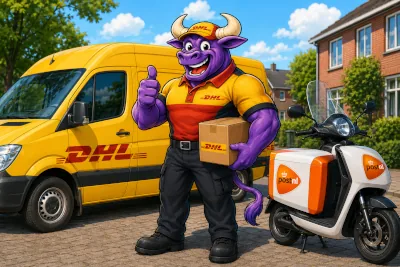
Delivery times: ordered before 12:00
| Ordered | Shipped | At your door |
|---|---|---|
| Monday before 12:00 | Tuesday | Wednesday |
| Monday after 12:00 | Wednesday | Thursday |
| Tuesday before 12:00 | Wednesday | Thursday |
| Tuesday after 12:00 | Thursday | Friday |
| Wednesday before 12:00 | Thursday | Friday |
| Wednesday after 12:00 | Friday | Saturday* or Monday |
| Thursday before 12:00 | Friday | Saturday* or Monday |
| Thursday after 12:00, Friday or weekend | Tuesday | Wednesday |
* DHL delivers on Saturdays in most regions; otherwise it will be Monday. We don't run on public holidays. During a holiday period, you'll see a notice on the site and in your order confirmation.
Shipping costs
€4.95
Per order, incl. VAT, for the Netherlands and Belgium alike. One rate, regardless of weight or number of parcels.
Free from €49.95
In products, including VAT. The shipping costs themselves don't count.
+€6.00 island surcharge
For the Wadden Islands and Marken, even above €49.95.
350 Dex-Points
Trade in your points for free shipping at checkout.
Pick-up
Picking up in Venlo is always free.
Follow-up delivery
If an item follows later, we always ship it at our expense.
Letterbox parcel
If your whole order fits through the letterbox, we prefer to send it as a letterbox parcel, usually with DHL tracking. You don't need to be at home. On the product page, small items show "Fits through the letterbox".
Other arrangements
- Items heavier than 25 kg each are sold to business customers only. It is about the weight of the item, not of your whole order.
- If you place several orders in quick succession, we combine shipments where possible. That saves packaging and transport.
- Large or heavy items (freight transport) go by trailer, only for business customers with a KVK/VAT number.
After your orderWhich emails you get, tracking your order, invoices and what to do if something isn't right
The emails you may receive from us
Almost everything happens automatically, but never without a reason. Every email carries your personal code word (if you've set one) and comes from dex@xtremeoffice.nl.
- ✅Right after paymentOrder confirmationYour items with the expected delivery day, a usage tip from Dex for each item, a fun fact about your purchase and, for hazardous substances, the safety data sheet as a PDF. For a follow-up delivery, the expected week is included.
- 🧾On shippingInvoice with track & traceAs soon as your parcel leaves, you'll receive the invoice (PDF) with the tracking link and a link to View your order. For pick-up: a note that you can come and collect.
- 📮On the wayForwarded messages from the carrierThe carrier emails a temporary address for your order with us. We forward those messages to you with a Dex header and your code word. That way you'll never lose, for example, the PIN code for a parcel locker.
- 📦DeliveredYour parcel has been deliveredWith the items that were in the parcel.
- ❓21:00 on the promised delivery day"Did you receive your shipment safely?"Only if the carrier hasn't reported a delivery by then. One click on the green button is enough; if you click red, Maurice gets an alert straight away and we'll go looking for your parcel. If your parcel is at a service point or parcel locker, you won't get this question.
- ⏳If it takes longerUpdate on your follow-up deliveryIf the delivery of a back-ordered item is pushed back by at least a week, you'll get a message with the new expected date. Never more than once a week.
- ⭐A few days after deliveryInvitation to leave a reviewA score out of 10 for your order and stars for each item. Dex responds to every review.
- 💡About 2 weeks laterPersonal tipA short, handy tip from Dex about what you bought.
- 🎁On your 10th order, and every 5th after thatA thank-you with a €7.50 gift cardA personal thank-you from Dex with a gift card. Even as a guest, simply to your email address.
- 👤After a guest orderInvitation to create an accountOnce only, the next working day, with no obligation (see chapter 6).
- 💳Only with Pay on receiptReminder and payment noticesA reminder 3 days before the payment deadline, after that only if you haven't paid yet.

I only send advertising if you've signed up for the newsletter. And don't worry: if I want to help you with something, for example after a failed payment, you'll get one message at most.
Tracking your order
- View your order: the link in your emails opens a page with all your items and, for each parcel, the status and tracking link. No need to log in.
- My account → Orders: all your orders, with status, invoices and tracking links.
- Dex: ask about your order in the chat with your order number and postcode. On WhatsApp with a linked account, your order number is enough.
Want to change something just after ordering?
If you order outside our depot's collection run (for example in the evening or at the weekend), we hold on to your order until the next collection run. My account will then show "we're processing your order, changes are still possible".
- Click Cancel next to an item. We refund the amount via your original payment method (anything paid with store credit goes back to your credit). If you cancel everything, the shipping costs too.
- If you cancel the last item, the whole order is cancelled.
- This works for paid orders with an account. As a guest, or with Pay on receipt: ask Dex.
 ▶Cancelling an order🔊 59 sec., with sound
 ▶My order is not complete🔊 62 sec., with sound
 ▶Delivered, but not received?🔊 57 sec., with sound
Follow-up delivery: your order isn't complete
If an item isn't ready to go straight away, we send the rest on ahead. The missing item follows free of charge as soon as it comes in. You'll be notified about this automatically. In View your order, you can see what's in each parcel. You'll receive the invoice for the whole order with the first shipment.
Is an item permanently unavailable from the supplier? Then you'll get an email with two buttons: Cancel and refund (via your original payment method) or Contact customer service.
Parcel reported as delivered, but not received?
- Check with the neighbours or ask in a neighbourhood app.
- Open the tracking link for the latest status. Sometimes a driver scans a parcel as delivered when running out of time; it then arrives later.
- Check with housemates, on the pile of post and in an external letterbox.
- Still nothing? Click the red button in the delivery email or contact Dex. If a parcel gets lost on the way, we send it again free of charge.
Invoices
- You receive the invoice as a PDF on shipping, per order.
- With an account, you can always download it again in My account → Orders.
- Lost it? Ask Dex to send it again.
- The invoice shows the payment method, your reference and, for Belgium, the VAT statement (OSS or reverse-charged).
Returns, cancellations & warrantyDeadlines, costs, refunds and what to do if something is faulty

We do everything we can to prevent returns: if you're in doubt, ask Dex first. If something still isn't right, arranging a return is quick and easy.
The three deadlines (private customers)
14 days to register
From the day you received the parcel, you register your return.
14 days to send
After registering, you have another 14 days to send the parcel back.
Refund within 14 days
As soon as we've received the return (or you've sent us proof of postage), we refund you within 14 days.
How to register a return
Withdraw from your purchase (everyone)
Click Withdraw from purchase on the returns page (/retour-melden) or the link in your order confirmation or invoice email. You'll get an email with a personal link to the form and, after submitting, an immediate acknowledgement of receipt. You don't need an account.
Via Dex
Ask in the chat, on WhatsApp or by email to dex@xtremeoffice.nl (from the email address you ordered with). Dex sends you the same email with the steps.
With an account
Go to My account → Orders and click the return button (up to 30 days after shipping; the statutory 14 days run from receipt).
In the form you choose the items and quantities, and how you'll send the parcel. You'll see straight away how much you get back. The email with the steps always goes to the email address of the order.
Return label from us: €6.50 per parcel
Incl. VAT, deducted from your refund. Each parcel gets its own label: two parcels = €13.00. Not required: you may also send it yourself. DHL in the Netherlands, PostNL in Belgium. You'll get the labels by email with the nearest service points and parcel lockers. Print each label and stick it on a separate box: a parcel locker won't accept a parcel without a label stuck on.
Send it yourself
With a carrier of your choice, at your own cost and with sufficient postage. Keep your proof of postage until you've received your refund.
Costs and refunds
- The shipping costs for sending it back are yours, unless the item is faulty or we made a mistake.
- If you return the whole order as a private customer, you'll also get the original shipping costs back. Not for a partial return.
- If you choose our return labels, we deduct €6.50 per parcel (incl. VAT) from your refund.
- Send the item back complete, with accessories and preferably in the original packaging. If it has been used or damaged more than was necessary to examine it, we may deduct the loss in value.
- Your money comes back via your original payment method: iDEAL/card via Mollie, credit as credit, split payments proportionally. Never compulsory store credit. With Pay on receipt, we reduce the outstanding amount.
- Dex-Points you received for the returned items are deducted again.
Why aren't returns free with us, like at the big online shops? Because there's no such thing as free. A return always costs money: shipping there and back, unpacking, checking, repacking and refunding. Anyone who offers "free" returns builds those costs into their prices, and then you help pay for other people's returns, even if you simply keep your order. We don't think that's fair. So: sharp prices for everyone, and you only pay for the return shipping if you decide to send something back yourself. Did we make a mistake? Then of course we pay for everything.
Faulty, wrong or incomplete delivery
I'm really sorry about that! Email a photo of the item and the contents, with your order number, to dex@xtremeoffice.nl and keep the packaging. We look at each case individually and sort it out: with a top-up delivery, a replacement or a refund. If the item is faulty or we made a mistake, we pay the return costs. Do let us know before you send anything back.
Ordered the wrong item yourself? Then Dex will point you to your right of return and help you think of an alternative. Sometimes he offers, as a one-off, to pay the shipping costs of your new order.
Cancelling
- As long as your order hasn't been processed yet: cancel it yourself per item in My account (see chapter 11); we refund via your original payment method.
- Already processed or on its way? Then you can no longer cancel. Refuse the parcel on delivery or register a return after receiving it.
- If we cancel something (for example because an item is no longer available), you'll always get an email about it and your money back.
The official withdrawal form and all the details are on xtremeoffice.nl/retourneren.
Dex, your digital colleagueChat, WhatsApp and e-mail: what Dex can do for you


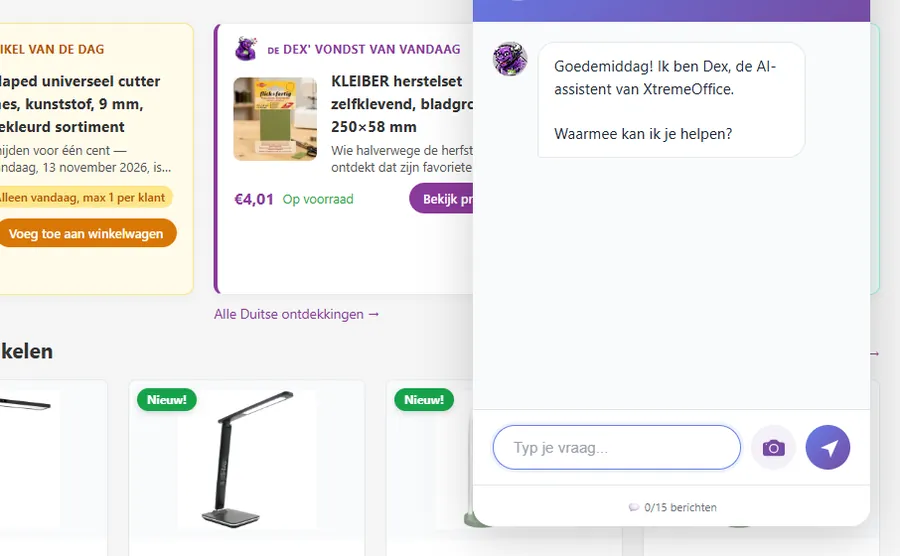
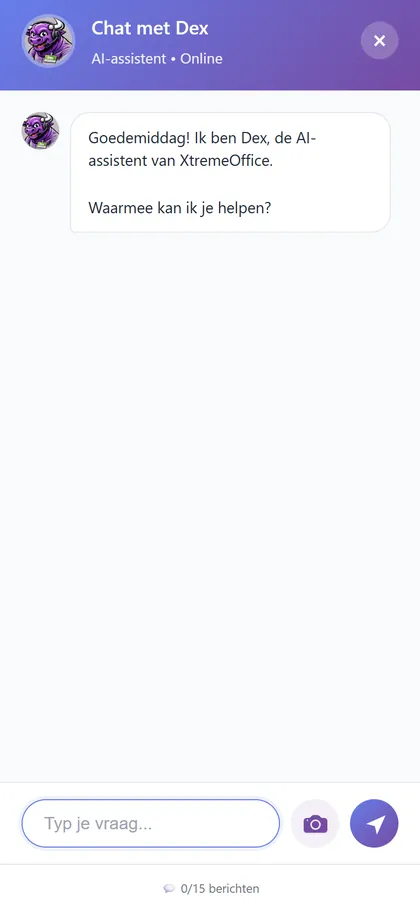
Dex is XtremeOffice's digital assistant. He runs on AI and knows the entire range, your orders (if you give him the right details) and all our rules. Quick, smart, honest and helpful… until you wave a red rag in front of him. 🐂
What Dex can do for you
Find products and give advice
"I'm looking for a quiet stapler for 50 sheets." Dex searches the real range, with price, stock and pack size, and also understands a price limit such as "under 10 euros".
Your whole list
At xtremeoffice.nl/lijstje Dex looks up an entire shopping list in one go and fills your basket (see chapter 3).
Search by photo
Send a photo of what you're looking for (in the chat with the camera, or on WhatsApp). Dex recognises it and searches for it.
Track your order
With your order number and postcode, Dex tells you the status, the tracking link and the expected delivery of any back-ordered items.
Resend an invoice
Lost your invoice? Dex sends it again to the e-mail address used for the order.
Register a return
Dex sends you an email with the steps and a button to the return form, always to the email address of your order.
Answer questions
Shipping, payment, VAT, Dex-Points, gift cards: Dex knows the answers from this manual and our FAQ.
Chatting on the website
- Open the chat with the purple Dex button at the bottom right or with Chat with Dex at the top.
- You can send a limited number of messages per day (15 during the day, fewer at night). The counter is shown below the input field.
- For questions about an order, Dex needs your order number and postcode.
- After a conversation, you can give a thumbs up or down to let us know whether Dex helped you well.
- Stay friendly: abusive language earns a warning and then a temporary block. 😇
WhatsApp with Dex
- Send a message to +31 6 57 91 59 74 (or click WhatsApp at the top of the site).
- In your first message, Dex is upfront that he is an AI assistant.
- Link your number in My Account → My details. Dex will then recognise you, address you by name and look up your order with just the order number.
- You can also send Dex a photo (of an empty cartridge, for example) or reply to his question with a thumbs up.
- WhatsApp takes a short break at night; you'll get a reply in the morning.
E-mailing Dex
E-mail dex@xtremeoffice.nl or simply reply to one of our e-mails. Put your order number in the subject line. Dex reads the mailbox throughout the day. He can resend invoices, register returns (up to €100 often approved straight away) and confirm collection appointments himself. Complaints always go to Maurice.

I'm an AI, not a human. So please don't share sensitive details such as passwords or bank details in the chat or on WhatsApp. I never need them. And if I'm not sure about something, I'll simply say so and ask Maurice.
Dex-Points & the Dex potSave with every order, and support a good cause together

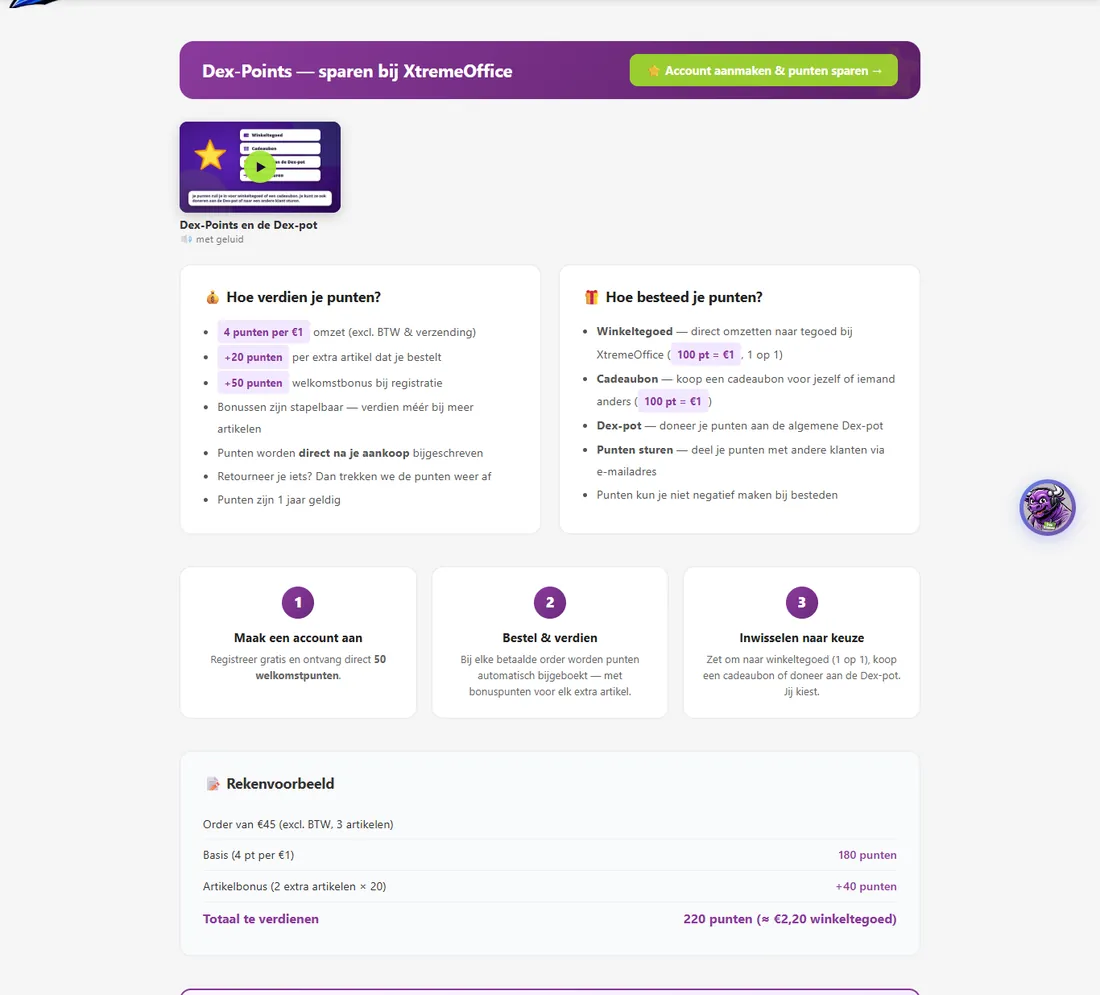
With an account, you earn Dex-Points on every paid order. 100 points = €1. You can convert them into store credit, a gift card, free shipping or a donation to a good cause.
How to earn points
| Action | Points |
|---|---|
| Per €1 of products (excl. VAT and shipping) | 4 |
| Per additional item in your order | +20 |
| Welcome bonus when you register | 50 |
| Buying a gift card (logged in) | 100 |
| Confirming points from another customer within 7 days | +50 bonus |
How to spend points
| Use | Value |
|---|---|
| Convert to store credit | 100 points = €1 |
| Gift card (for yourself or someone else, €10–€250) | 100 points = €1 |
| Free shipping at checkout | 350 points |
| Donate to the Dex pot | 100 points = €1 for the good cause |
| Send points to another customer | The recipient confirms within 30 days |
Good to know
- Points are credited as soon as your payment has been received. With Pay on receipt, straight away when you order.
- Points are valid for 12 months. In My Account you can see when they expire.
- If you return something, we deduct the points for those items again. Your balance may then temporarily go negative.
- Credit from points cannot be paid out; you spend it in the webshop.
- If you order as a guest, the points from your order go to the Dex pot.
The Dex pot: saving together for a good cause
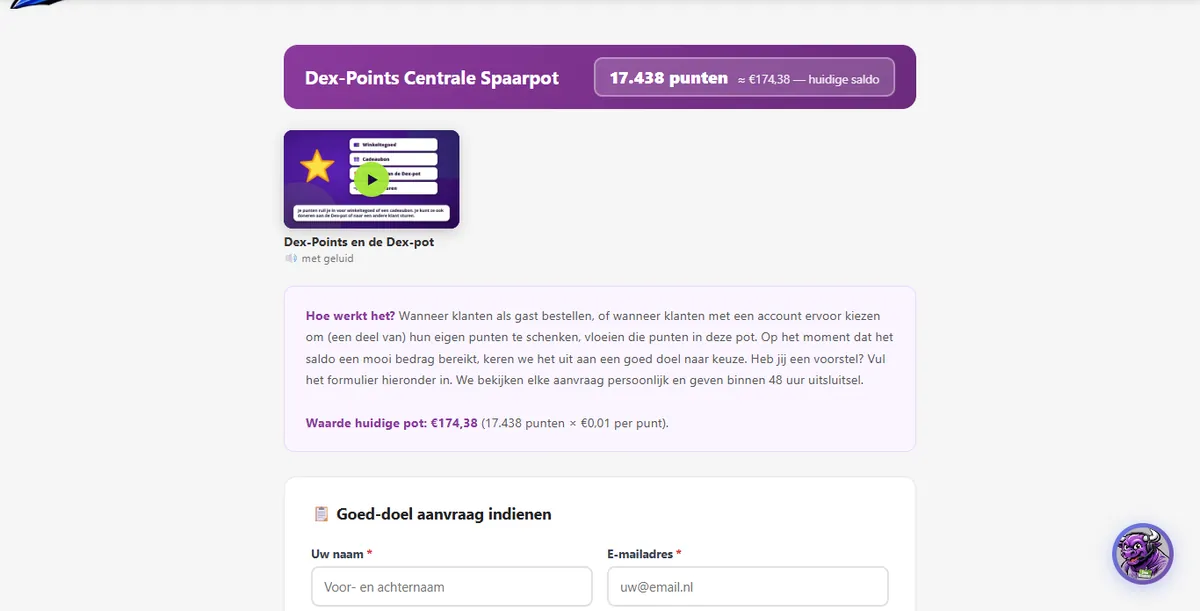
The Dex pot collects the points from all guest orders and the points that customers donate themselves. Once the pot is nicely filled, we pay it out to a good cause. The causes we have already supported are listed below the form. The first was Schoenendoosactie.nl (September 2026).
Know a good cause? Nominate it at xtremeoffice.nl/dex-pot: who you are, the cause, the amount you have in mind and what it will be spent on. We look at every request personally and respond within 48 hours.
Gift cards & store creditGiving, receiving and spending a personal gift card

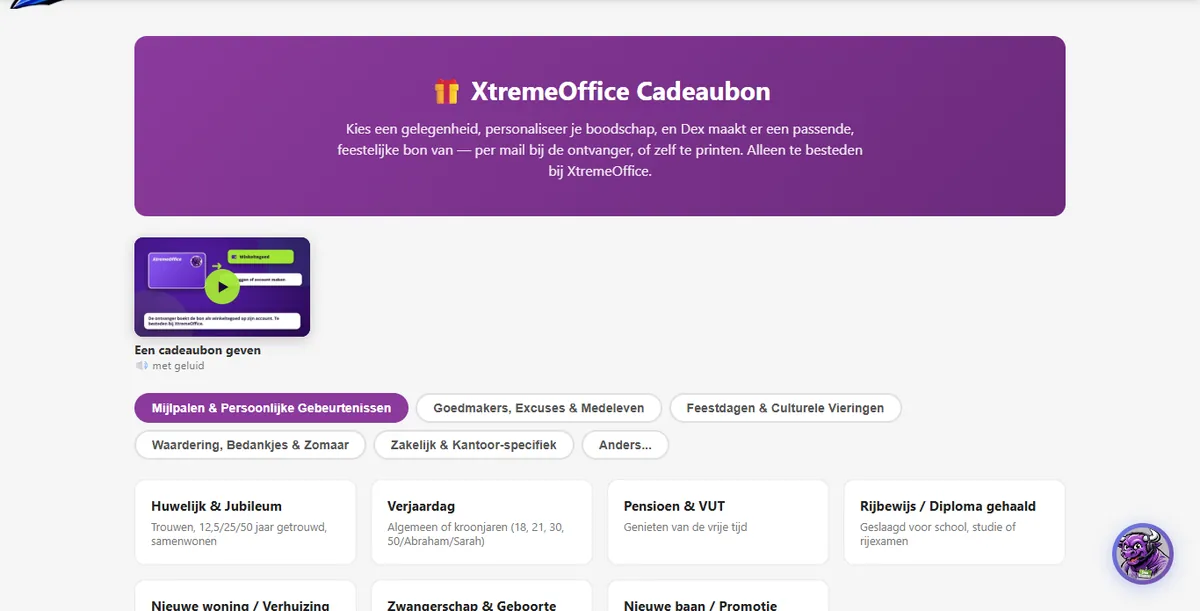
Giving a gift card
- Go to xtremeoffice.nl/cadeaubon (or click Gift card at the top).
- Choose an occasion: milestones and personal occasions, make-ups and sympathy, holidays, appreciation and thank-yous, business, or Other…, where you describe the occasion yourself.
- Write your personal message and choose an amount between €10 and €250.
- Choose how the gift card arrives: by e-mail to the recipient, or as a PDF to print yourself (in that case we send nothing to the recipient and e-mail you a one-time download link).
- Pay via Mollie. You receive the invoice straight away. With an account, you also get 100 Dex-Points.
Every gift card gets its own background to suit the occasion. For festive occasions Dex joins in; for an apology or condolences he modestly stays out of the picture. When the recipient opens the gift card, they see a short reveal animation and you get a one-time notification that the card has been opened.
Redeeming a gift card

- Click the link in the gift card e-mail, or enter the code at xtremeoffice.nl/cadeaubon-inwisselen.
- Log in or create an account: the amount is added to your store credit.
- A gift card is valid for 2 years. You don't have to use it all at once.
- Lost a printed gift card? Get in touch and we'll see what we can do.
A gift card from your Dex-Points
In My Account → Dex-Points you can turn your points into a gift card, for yourself or someone else (100 points = €1, €10–€250). The gift card is active immediately and the recipient receives it by e-mail.
A thank-you on your 10th order

On your 10th order, and then on every 5th order after that, I send you a personal thank-you with a gift card worth €7.50. Simply because you keep coming back. 💜
Store credit
- Your balance is shown in My Account → Store credit, with all transactions.
- Topping up is possible from €5. The maximum balance is €500 and credit is valid for 24 months.
- At checkout, you can use it to pay in full or in part.
- You can request a refund of credit you paid for yourself in the same tab, from €0.50 and free of charge. It usually goes straight back to your account. Credit from Dex-Points or free gift cards is not paid out.
Quotes & special offersGet approval first, large quantities, a better price

- On a product page, click Add to quote (anyone can do this), or at checkout convert your entire basket into a quote in one click. At the top, next to your basket, you can see how many items are on your quote.
- To make the quote final, log in or create an account.
- For somewhat larger quantities, we automatically calculate a volume discount in the quote.
- You receive the quote as a PDF by e-mail, with the product datasheets of all items. The quote is valid for 7 days and can be found in My Account → Quotes.
- Happy with it? Approve the quote: it goes into your basket and you order it as a regular order. If a price has changed in the meantime, we play fair and charge the current price.
Belgium & languagesOrdering from Belgium and the webshop in French or English
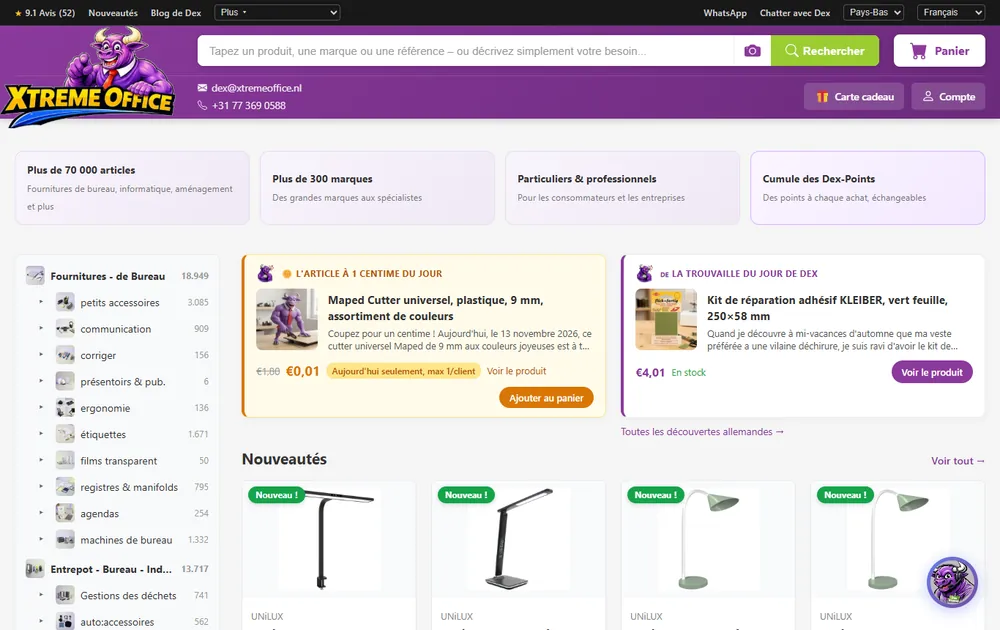
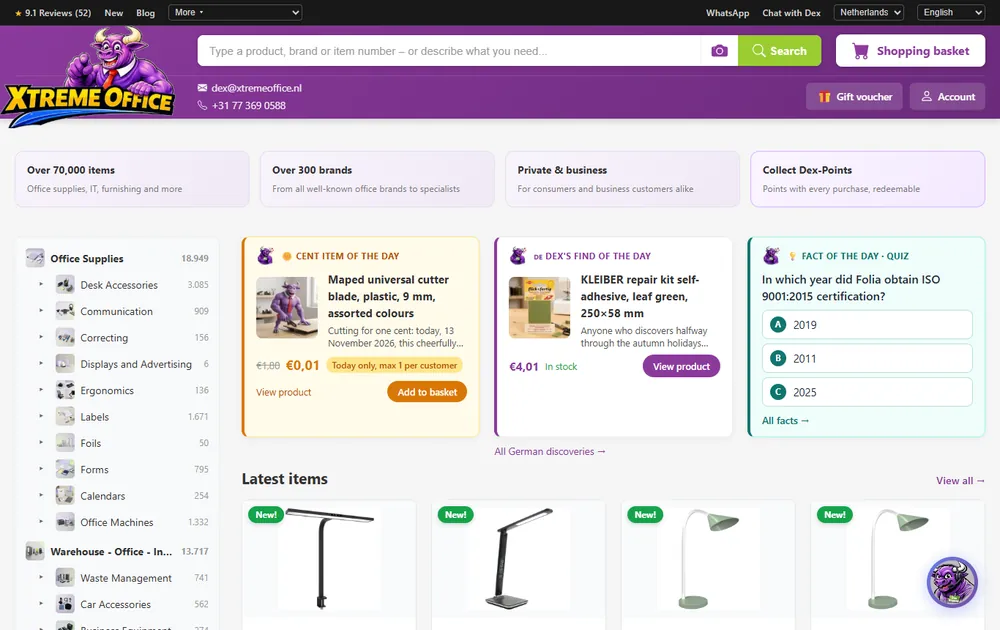
Choosing your country and language
At the top right, you choose your country (the Netherlands or Belgium) and your language (Dutch, French or English). We remember your choice for a year. Your country determines the VAT and the delivery rules; your language determines the texts. You receive e-mails in the language you ordered in.
Ordering from Belgium 🇧🇪
- The same shipping costs: €4.95, free from €49.95 in products.
- Belgian VAT (21%, and 6% on food) via the OSS scheme; for businesses with a valid VAT number and confirmation: VAT reverse-charged (see chapter 9).
- Your order number contains BE (for example BE50-…), so we can see straight away that it's going to Belgium.
- Pay on receipt is not available for Belgium. Bancontact is, via Mollie.
- Collection in Venlo is also possible, ideal if you happen to be in the area.
- Product texts are automatically translated into French (including Belgian French) and English. Dex speaks all three languages.
Privacy & securityShopping without prying eyes, and how to recognise genuine e-mails from us

- No tracking: no Google Analytics, no Facebook pixel, no ad trackers, no tracking cookies. We don't share visitor or purchase data with comparison sites.
- Encrypted: we store your name, address, phone number, date of birth, company, Chamber of Commerce (KVK) and VAT details and code word in encrypted form (AES-256), on servers in the EU.
- Only what's needed: payment details go to Mollie, your delivery address to the carrier.
- Dex runs on AI (from Anthropic). Searching by photo happens without us storing the photo.
- Retention periods: we keep chat conversations and e-mail records for a maximum of 12 months, visit data for 90 days. Invoices for as long as the law requires.

How to recognise a genuine e-mail from XtremeOffice
- The e-mail comes from an @xtremeoffice.nl address (usually dex@xtremeoffice.nl).
- Your code word is shown at the top, if you have set one in My Account.
- We never ask for your password or bank details by e-mail, chat or WhatsApp.
- Not sure? Don't click anything and forward the e-mail to dex@xtremeoffice.nl.
You'll find all the details in our privacy policy and cookie policy.
Customer journeys in practiceSix examples from start to finish
What does it look like in real life? Six typical customers, with the steps they go through. (The names are made up, the steps are not.)
A few pens in a hurry, as a guest
- On Tuesday at 10:15, Sanne searches for fineliner black, puts two in her basket and spots the one-cent item on the homepage: an eraser for €0.01.
- The basket shows she needs a little more for free shipping, but she's fine with €4.95.
- She checks out as a guest with iDEAL. The order confirmation promises delivery on Thursday.
- Everything fits through the letterbox. On Wednesday she gets the invoice with track & trace; on Thursday the parcel is on her doormat.
- The next working day she receives a single invitation to create an account. She does it right away: her earlier order is already there, and from her next order onwards she earns Dex-Points herself.
Office supplies via a quote
- Mark puts printer paper, staples and coffee on a quote and sees that the quote automatically applies a volume discount to the large quantities.
- The PDF with datasheets goes to his manager. Once it's signed off, he approves the quote in My Account: everything is in the basket.
- He enters the purchase order number as a reference. His account has a valid VAT number and he has the order delivered to the business address, so he can choose business Pay on receipt (up to €250).
- When the order ships, he receives the invoice with VAT shown separately and his reference on it; he pays within 8 days using the payment button.
Ordering as a business from Belgium, VAT reverse-charged
- Luc selects Belgium and French at the top right. He creates a business account with his Belgian VAT number, which is checked against VIES immediately.
- At checkout he ticks the box to confirm that he is VAT-registered and applies the reverse charge himself. The total becomes 0% VAT.
- He pays with Bancontact. The invoice states his VAT number and the reverse charge, so he can declare it himself.
A return via Dex
- Ahmed accidentally ordered A5 notebooks instead of A4. He replies to the invoice e-mail: "I want to send back the A5 notebooks."
- Dex checks that the e-mail comes from the address used for the order and that the order is within the return period, and sends him the email with the steps.
- Ahmed clicks the button, chooses the A5 notebooks and submits his withdrawal; he gets an acknowledgement of receipt straight away. Everything fits in one box, so he chooses one return label. He gets the DHL label by email, sticks it on the box and drops it at a parcel locker. Once it has been received, he gets his money back via iDEAL, minus €6.50 for that one label.
- Dex helps him find the right A4 notebooks for his new order.
A gift card to print
- Kees chooses the occasion Driving Licence / Diploma Obtained, writes a message for his granddaughter and chooses €25.
- He chooses print it yourself and pays. He receives a one-time download link and prints the gift card on A4.
- His granddaughter enters the code at /cadeaubon-inwisselen, creates an account and has €25 of store credit for her studies.
Where is my parcel?
- Linda ordered on Monday before 12:00: promised for Wednesday. At 21:00 that Wednesday, the carrier still hasn't reported a delivery.
- She receives the e-mail "Have you received your shipment properly?" and clicks the red button.
- Maurice is notified immediately and looks up the parcel. It turns out to have gone missing in transit: Linda receives a new shipment free of charge.
Quick answersThe most frequently asked questions, short and sweet
Do I need an account to order?
Can I order my whole shopping list in one go?
When will I receive my order?
How much is shipping?
Which payment methods are available?
Why can't I see Pay on receipt?
Do the prices include VAT?
Can I still change or cancel my order?
How long do I have to return something?
I received a broken or wrong item.
According to the tracking my parcel was delivered, but I don't have it.
How many Dex-Points do I get?
How long is a gift card valid?
Do you deliver outside the Netherlands and Belgium?
What is the maximum weight?
I'm not receiving any e-mails from you.
Is Dex a real person?
Can I also call you?
You'll find even more questions and answers on the FAQ page.
Contact & company detailsHow to reach us
Chat with Dex
On every page, day and night.
+31 6 57 91 59 74
Phone
+31 (0)77 369 0588
Address
Groethofstraat 9 B
5916 PA Venlo
Ready to shop?
You now know everything you need to know. Can't find your question? Dex is there day and night in the chat, on WhatsApp and at dex@xtremeoffice.nl.